Compare commits
11 Commits
| Author | SHA1 | Date | |
|---|---|---|---|

|
ac34edec7f | ||
|
|
6dd8ffa037 | ||
|
|
eaed3f40a2 | ||
|
|
e48f39375e | ||
|
|
9b7b651ef9 | ||
|
|
b5623cb9c2 | ||
|
|
144d12b463 | ||
|
|
fa452f5518 | ||
|
|
a159d21d45 | ||
|
|
3a00bbf44d | ||

|
9f5e94fa8f |
@@ -1,17 +1,9 @@
|
||||
## Changes
|
||||
|
||||
- add web-rwkv-converter (Safetensors Convert no longer depends on Python) (WebGPU Server 0.3.3)
|
||||
- model tags classifier
|
||||
- improve presets interaction
|
||||
- better state cache
|
||||
- better customCuda condition
|
||||
- add python-3.10.11-embed-amd64.zip cnMirror
|
||||
- always reset to activePreset
|
||||
- for devices that gpu is not supported, use cpu to merge lora
|
||||
- RWKV_RESCALE_LAYER 999 for music model
|
||||
- disable hashed assets
|
||||
- fix webWails undefined functions
|
||||
- fix damaged logo
|
||||
- allow importing midi file
|
||||
- add midi tracks to webUI
|
||||
- improve current instrument display
|
||||
- fix generation instrumentType
|
||||
- chore
|
||||
|
||||
## Install
|
||||
|
||||
113
README.md
113
README.md
@@ -21,7 +21,7 @@ English | [简体中文](README_ZH.md) | [日本語](README_JA.md)
|
||||
[![MacOS][MacOS-image]][MacOS-url]
|
||||
[![Linux][Linux-image]][Linux-url]
|
||||
|
||||
[FAQs](https://github.com/josStorer/RWKV-Runner/wiki/FAQs) | [Preview](#Preview) | [Download][download-url] | [Server-Deploy-Examples](https://github.com/josStorer/RWKV-Runner/tree/master/deploy-examples)
|
||||
[FAQs](https://github.com/josStorer/RWKV-Runner/wiki/FAQs) | [Preview](#Preview) | [Download][download-url] | [Simple Deploy Example](#Simple-Deploy-Example) | [Server Deploy Examples](https://github.com/josStorer/RWKV-Runner/tree/master/deploy-examples) | [MIDI Hardware Input](#MIDI-Input)
|
||||
|
||||
[license-image]: http://img.shields.io/badge/license-MIT-blue.svg
|
||||
|
||||
@@ -57,20 +57,49 @@ English | [简体中文](README_ZH.md) | [日本語](README_JA.md)
|
||||
|
||||
## Features
|
||||
|
||||
- RWKV model management and one-click startup
|
||||
- Fully compatible with the OpenAI API, making every ChatGPT client an RWKV client. After starting the model,
|
||||
- RWKV model management and one-click startup.
|
||||
- Front-end and back-end separation, if you don't want to use the client, also allows for separately deploying the
|
||||
front-end service, or the back-end inference service, or the back-end inference service with a WebUI.
|
||||
[Simple Deploy Example](#Simple-Deploy-Example) | [Server Deploy Examples](https://github.com/josStorer/RWKV-Runner/tree/master/deploy-examples)
|
||||
- Compatible with the OpenAI API, making every ChatGPT client an RWKV client. After starting the model,
|
||||
open http://127.0.0.1:8000/docs to view more details.
|
||||
- Automatic dependency installation, requiring only a lightweight executable program
|
||||
- Configs with 2G to 32G VRAM are included, works well on almost all computers
|
||||
- User-friendly chat and completion interaction interface included
|
||||
- Easy-to-understand and operate parameter configuration
|
||||
- Built-in model conversion tool
|
||||
- Built-in download management and remote model inspection
|
||||
- Built-in one-click LoRA Finetune
|
||||
- Can also be used as an OpenAI ChatGPT and GPT-Playground client
|
||||
- Multilingual localization
|
||||
- Theme switching
|
||||
- Automatic updates
|
||||
- Automatic dependency installation, requiring only a lightweight executable program.
|
||||
- Pre-set multi-level VRAM configs, works well on almost all computers. In Configs page, switch Strategy to WebGPU, it
|
||||
can also run on AMD, Intel, and other graphics cards.
|
||||
- User-friendly chat, completion, and composition interaction interface included. Also supports chat presets, attachment
|
||||
uploads, MIDI hardware input, and track editing.
|
||||
[Preview](#Preview) | [MIDI Hardware Input](#MIDI-Input)
|
||||
- Built-in WebUI option, one-click start of Web service, sharing your hardware resources.
|
||||
- Easy-to-understand and operate parameter configuration, along with various operation guidance prompts.
|
||||
- Built-in model conversion tool.
|
||||
- Built-in download management and remote model inspection.
|
||||
- Built-in one-click LoRA Finetune.
|
||||
- Can also be used as an OpenAI ChatGPT and GPT-Playground client. (Fill in the API URL and API Key in Settings page)
|
||||
- Multilingual localization.
|
||||
- Theme switching.
|
||||
- Automatic updates.
|
||||
|
||||
## Simple Deploy Example
|
||||
|
||||
```bash
|
||||
git clone https://github.com/josStorer/RWKV-Runner
|
||||
|
||||
# Then
|
||||
cd RWKV-Runner
|
||||
python ./backend-python/main.py #The backend inference service has been started, request /switch-model API to load the model, refer to the API documentation: http://127.0.0.1:8000/docs
|
||||
|
||||
# Or
|
||||
cd RWKV-Runner/frontend
|
||||
npm ci
|
||||
npm run build #Compile the frontend
|
||||
cd ..
|
||||
python ./backend-python/webui_server.py #Start the frontend service separately
|
||||
# Or
|
||||
python ./backend-python/main.py --webui #Start the frontend and backend service at the same time
|
||||
|
||||
# Help Info
|
||||
python ./backend-python/main.py -h
|
||||
```
|
||||
|
||||
## API Concurrency Stress Testing
|
||||
|
||||
@@ -133,6 +162,48 @@ for i in np.argsort(embeddings_cos_sim)[::-1]:
|
||||
print(f"{embeddings_cos_sim[i]:.10f} - {values[i]}")
|
||||
```
|
||||
|
||||
## MIDI Input
|
||||
|
||||
Tip: You can download https://github.com/josStorer/sgm_plus and unzip it to the program's `assets/sound-font` directory
|
||||
to use it as an offline sound source. Please note that if you are compiling the program from source code, do not place
|
||||
it in the source code directory.
|
||||
|
||||
### USB MIDI Connection
|
||||
|
||||
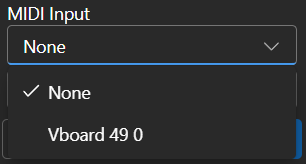
- USB MIDI devices are plug-and-play, and you can select your input device in the Composition page
|
||||
- 
|
||||
|
||||
### Mac MIDI Bluetooth Connection
|
||||
|
||||
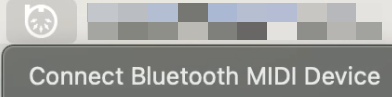
- For Mac users who want to use Bluetooth input,
|
||||
please install [Bluetooth MIDI Connect](https://apps.apple.com/us/app/bluetooth-midi-connect/id1108321791), then click
|
||||
the tray icon to connect after launching,
|
||||
afterwards, you can select your input device in the Composition page.
|
||||
- 
|
||||
|
||||
### Windows MIDI Bluetooth Connection
|
||||
|
||||
- Windows seems to have implemented Bluetooth MIDI support only for UWP (Universal Windows Platform) apps. Therefore, it
|
||||
requires multiple steps to establish a connection. We need to create a local virtual MIDI device and then launch a UWP
|
||||
application. Through this UWP application, we will redirect Bluetooth MIDI input to the virtual MIDI device, and then
|
||||
this software will listen to the input from the virtual MIDI device.
|
||||
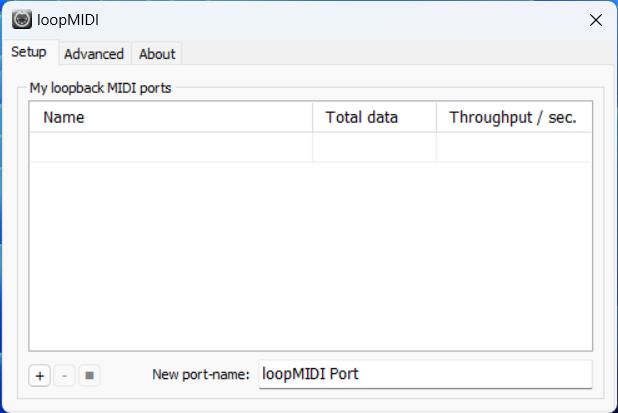
- So, first, you need to
|
||||
download [loopMIDI](https://www.tobias-erichsen.de/wp-content/uploads/2020/01/loopMIDISetup_1_0_16_27.zip)
|
||||
to create a virtual MIDI device. Click the plus sign in the bottom left corner to create the device.
|
||||
- 
|
||||
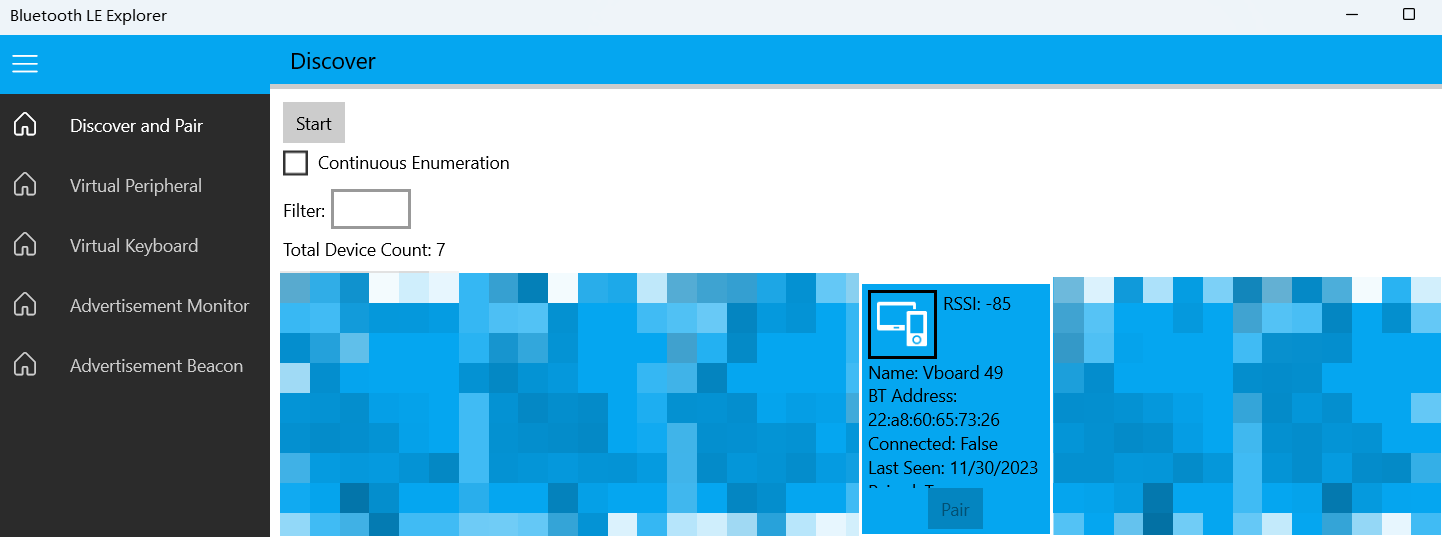
- Next, you need to download [Bluetooth LE Explorer](https://apps.microsoft.com/detail/9N0ZTKF1QD98) to discover and
|
||||
connect to Bluetooth MIDI devices. Click "Start" to search for devices, and then click "Pair" to bind the MIDI device.
|
||||
- 
|
||||
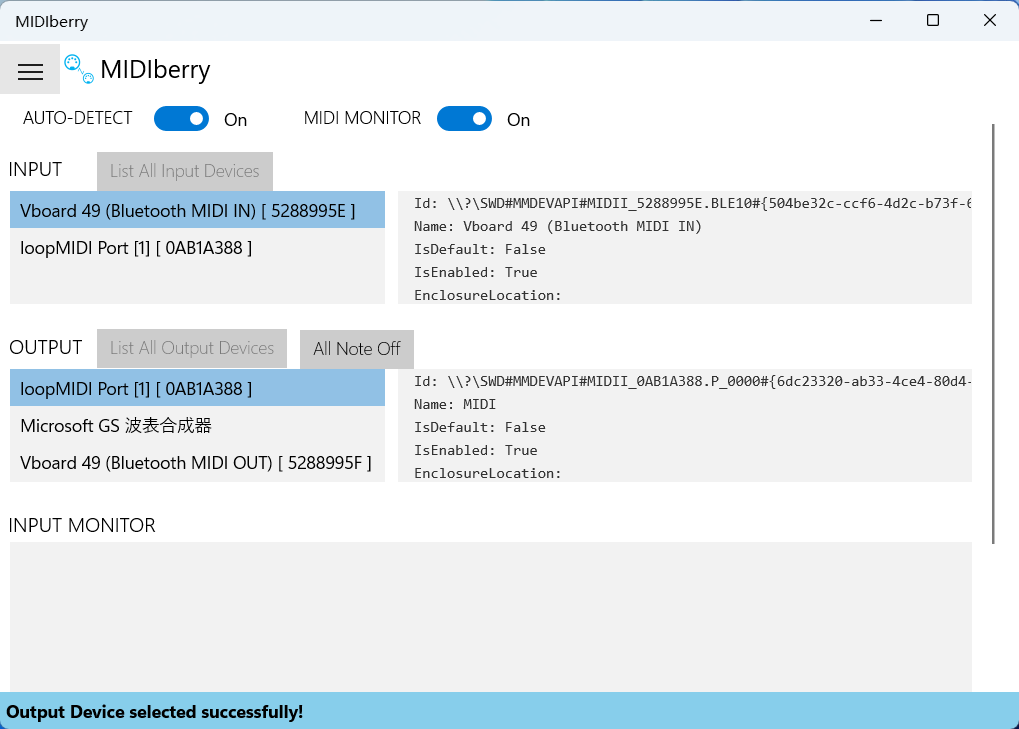
- Finally, you need to install [MIDIberry](https://apps.microsoft.com/detail/9N39720H2M05),
|
||||
This UWP application can redirect Bluetooth MIDI input to the virtual MIDI device. After launching it, double-click
|
||||
your actual Bluetooth MIDI device name in the input field, and in the output field, double-click the virtual MIDI
|
||||
device name we created earlier.
|
||||
- 
|
||||
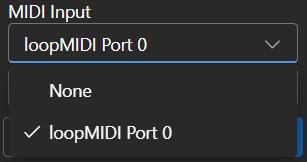
- Now, you can select the virtual MIDI device as the input in the Composition page. Bluetooth LE Explorer no longer
|
||||
needs to run, and you can also close the loopMIDI window, it will run automatically in the background. Just keep
|
||||
MIDIberry open.
|
||||
- 
|
||||
|
||||
## Related Repositories:
|
||||
|
||||
- RWKV-4-World: https://huggingface.co/BlinkDL/rwkv-4-world/tree/main
|
||||
@@ -146,27 +217,35 @@ for i in np.argsort(embeddings_cos_sim)[::-1]:
|
||||
|
||||
### Homepage
|
||||
|
||||

|
||||
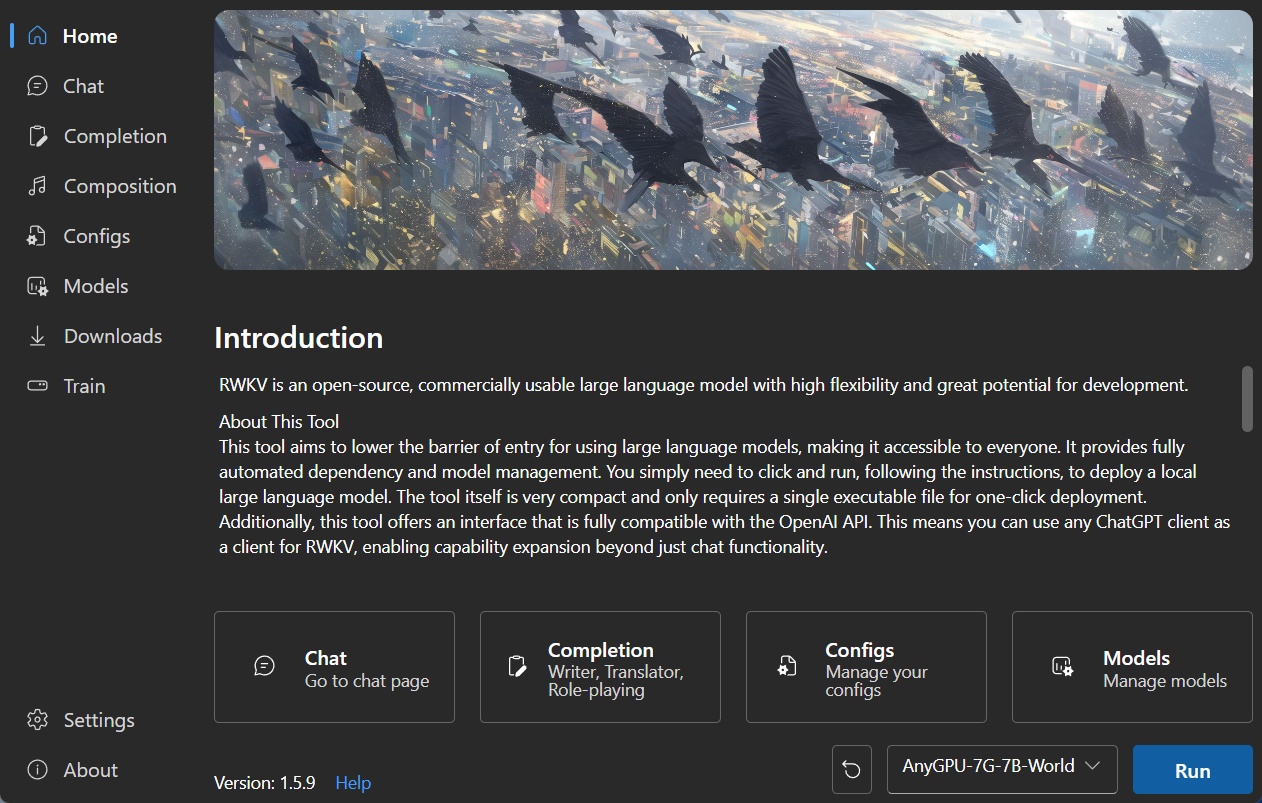
|
||||
|
||||
### Chat
|
||||
|
||||
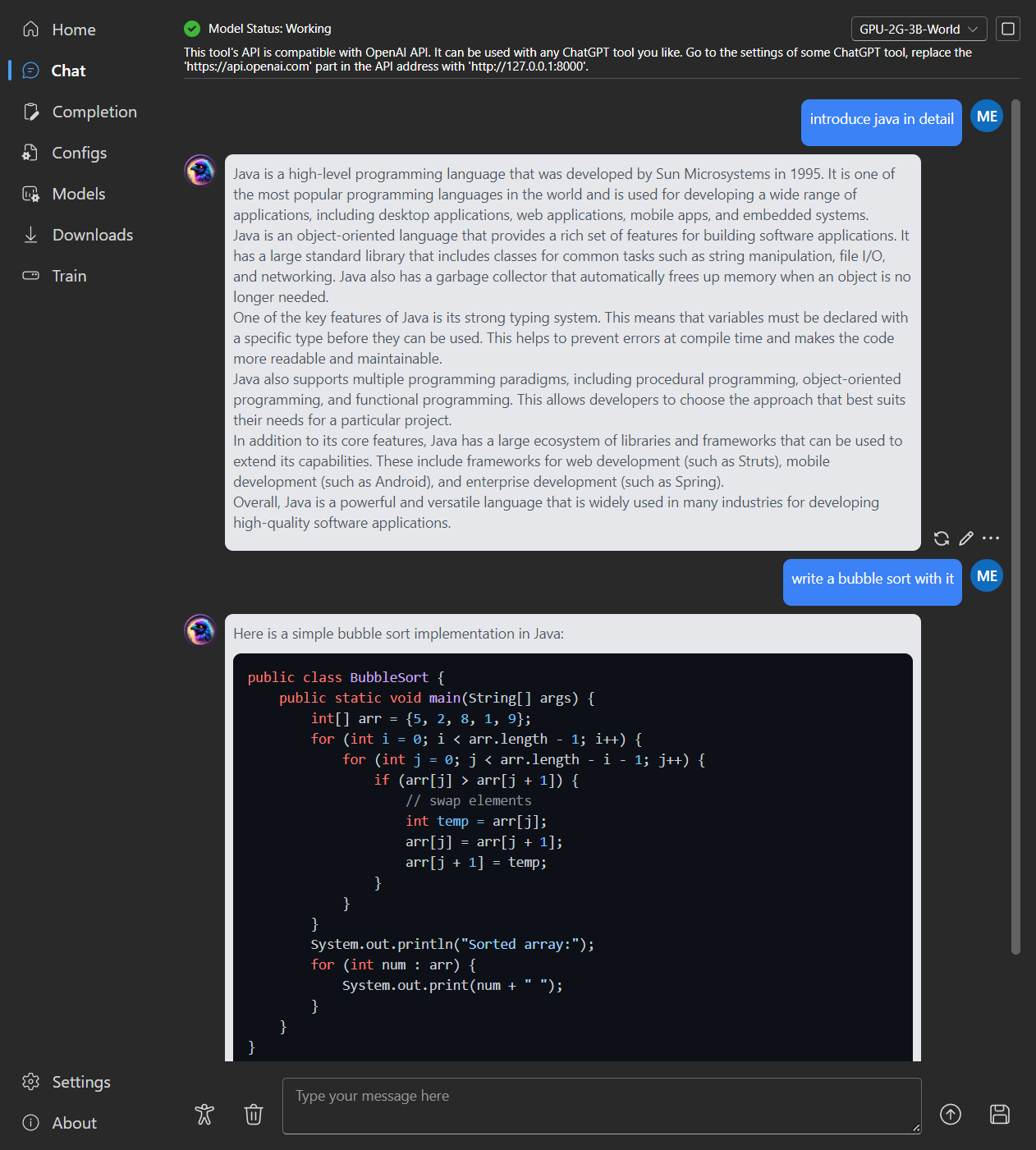
|
||||
|
||||
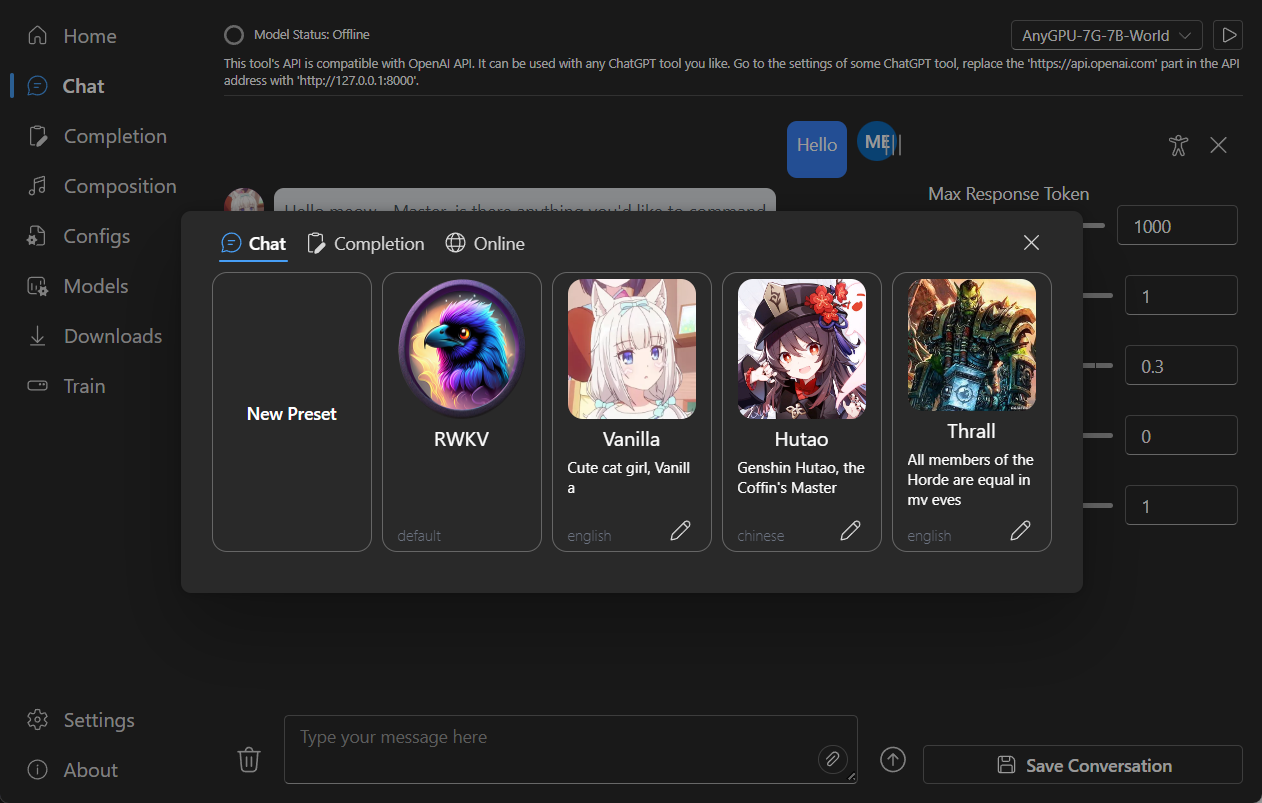
|
||||
|
||||
### Completion
|
||||
|
||||
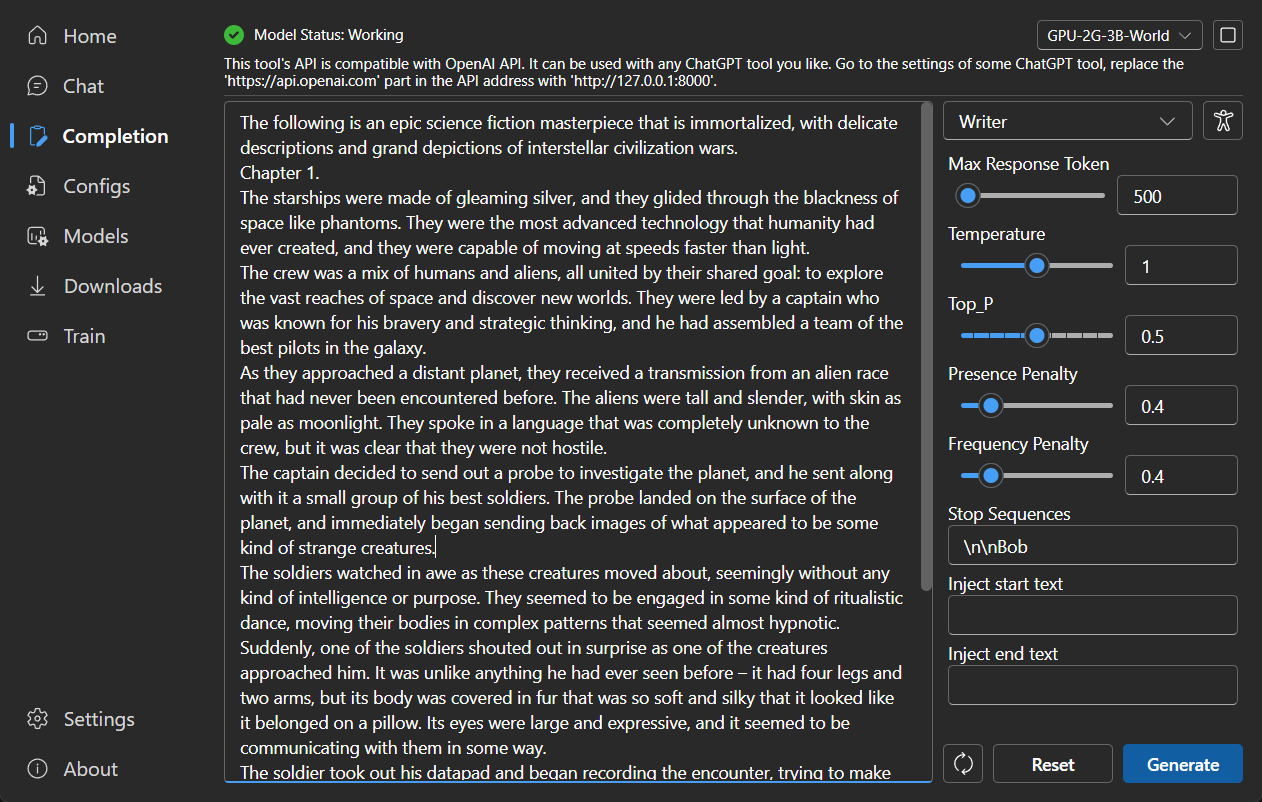
|
||||
|
||||
### Composition
|
||||
|
||||
Tip: You can download https://github.com/josStorer/sgm_plus and unzip it to the program's `assets/sound-font` directory
|
||||
to use it as an offline sound source. Please note that if you are compiling the program from source code, do not place
|
||||
it in the source code directory.
|
||||
|
||||
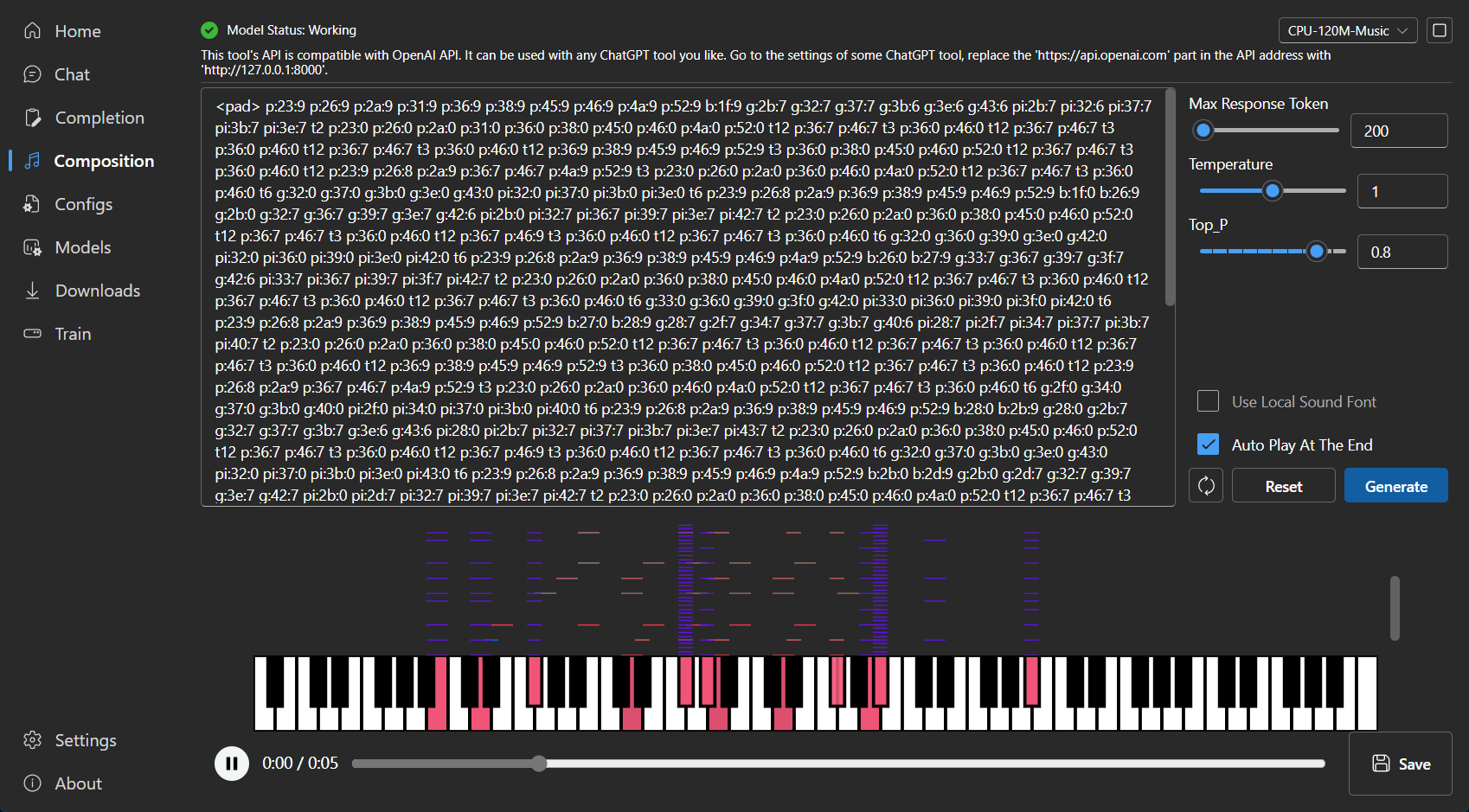
|
||||
|
||||
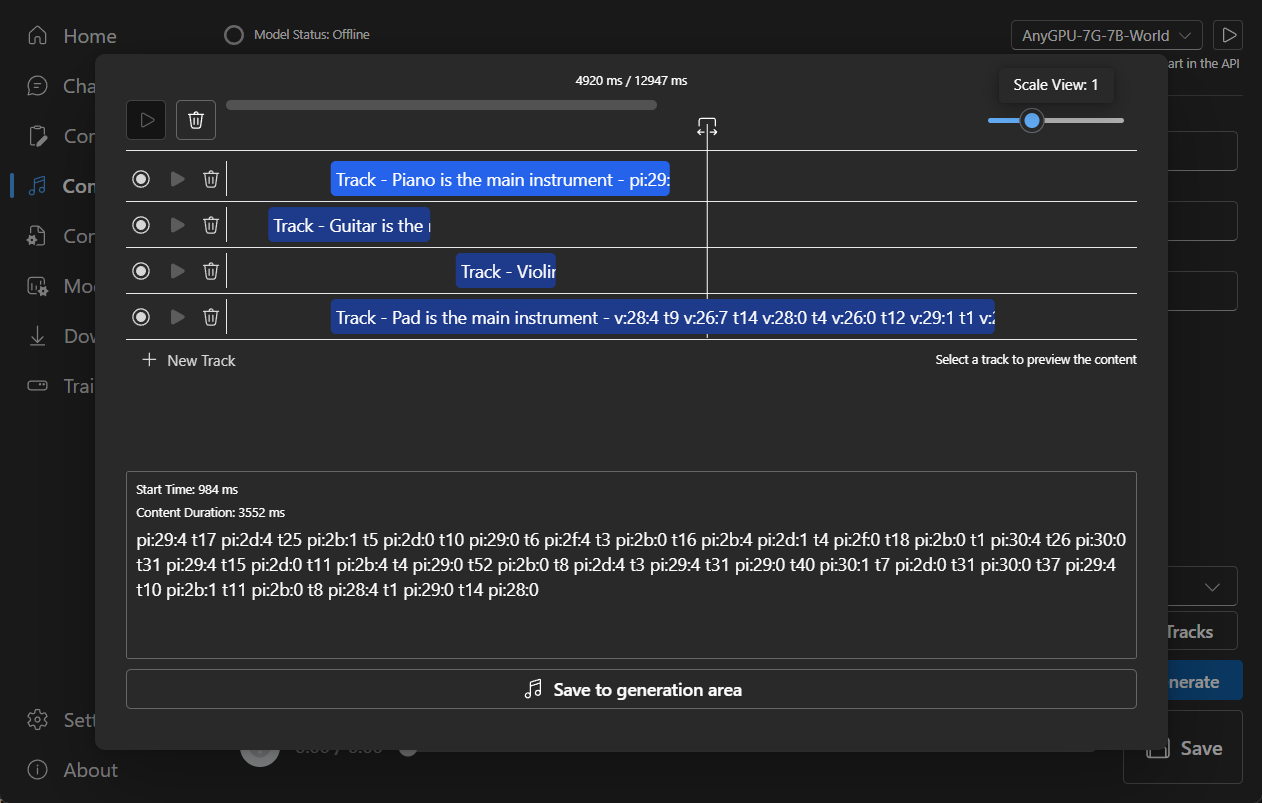
|
||||
|
||||
### Configuration
|
||||
|
||||

|
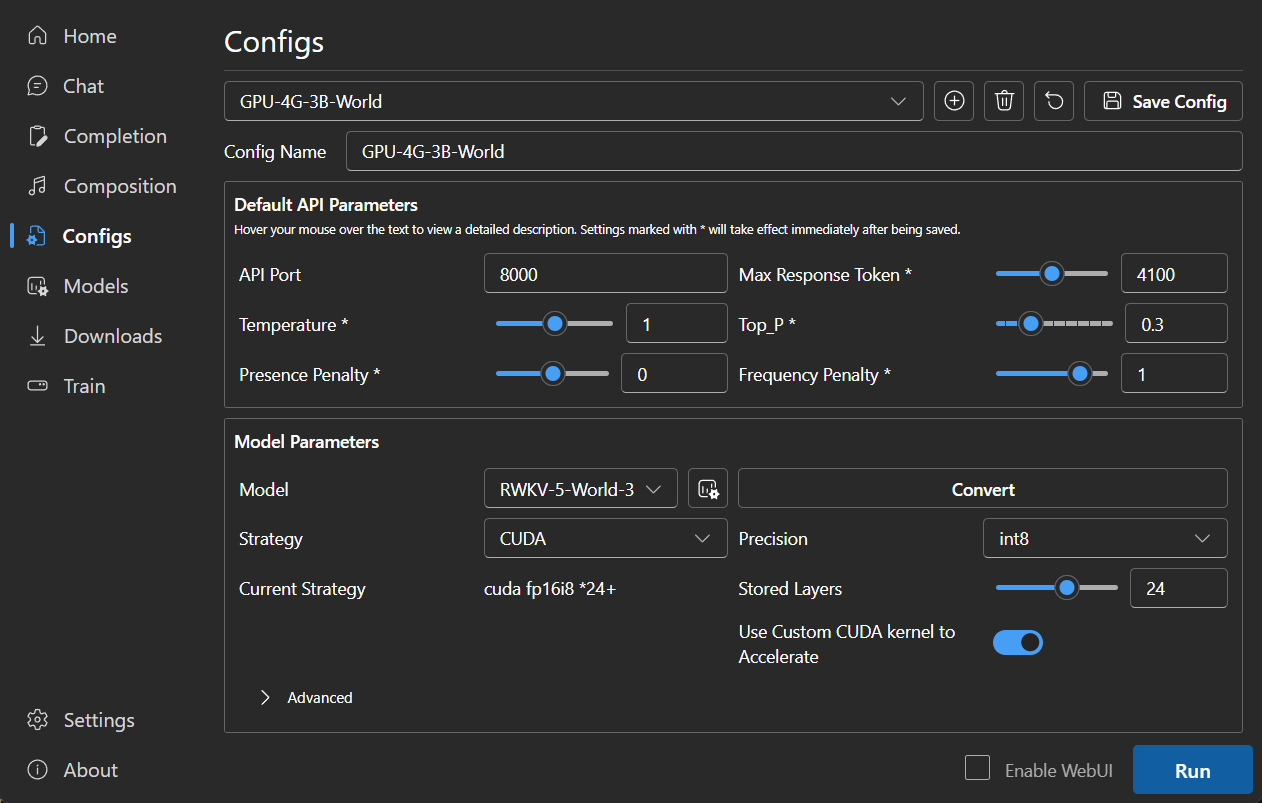
||||
|
||||
|
||||
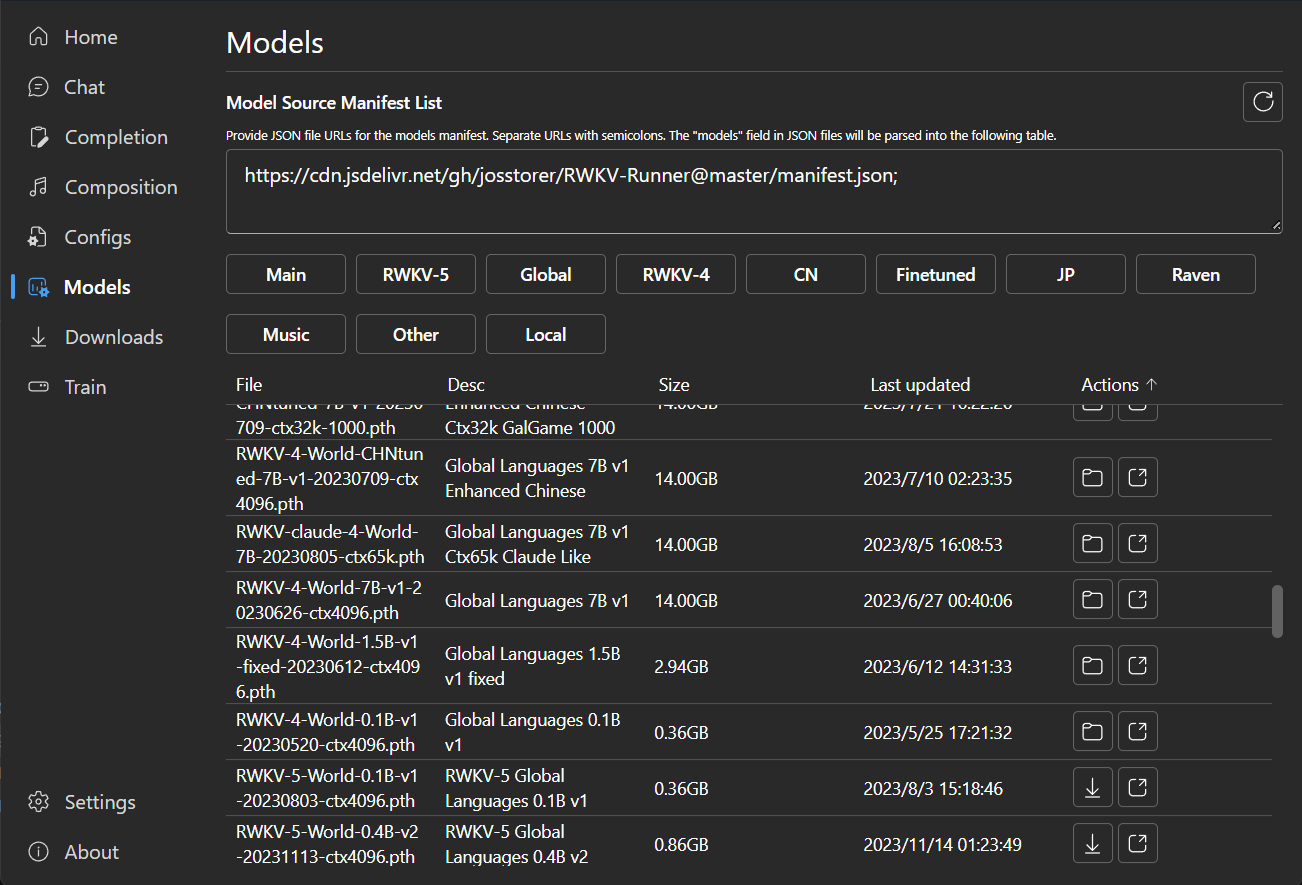
### Model Management
|
||||
|
||||

|
||||
|
||||
|
||||
### Download Management
|
||||
|
||||
|
||||
97
README_JA.md
97
README_JA.md
@@ -21,7 +21,7 @@
|
||||
[![MacOS][MacOS-image]][MacOS-url]
|
||||
[![Linux][Linux-image]][Linux-url]
|
||||
|
||||
[FAQs](https://github.com/josStorer/RWKV-Runner/wiki/FAQs) | [プレビュー](#Preview) | [ダウンロード][download-url] | [サーバーデプロイ例](https://github.com/josStorer/RWKV-Runner/tree/master/deploy-examples)
|
||||
[FAQs](https://github.com/josStorer/RWKV-Runner/wiki/FAQs) | [プレビュー](#Preview) | [ダウンロード][download-url] | [シンプルなデプロイの例](#Simple-Deploy-Example) | [サーバーデプロイ例](https://github.com/josStorer/RWKV-Runner/tree/master/deploy-examples) | [MIDIハードウェア入力](#MIDI-Input)
|
||||
|
||||
[license-image]: http://img.shields.io/badge/license-MIT-blue.svg
|
||||
|
||||
@@ -58,20 +58,47 @@
|
||||
## 特徴
|
||||
|
||||
- RWKV モデル管理とワンクリック起動
|
||||
- OpenAI API と完全に互換性があり、すべての ChatGPT クライアントを RWKV クライアントにします。モデル起動後、
|
||||
- フロントエンドとバックエンドの分離は、クライアントを使用しない場合でも、フロントエンドサービス、またはバックエンド推論サービス、またはWebUIを備えたバックエンド推論サービスを個別に展開することを可能にします。
|
||||
[シンプルなデプロイの例](#Simple-Deploy-Example) | [サーバーデプロイ例](https://github.com/josStorer/RWKV-Runner/tree/master/deploy-examples)
|
||||
- OpenAI API と互換性があり、すべての ChatGPT クライアントを RWKV クライアントにします。モデル起動後、
|
||||
http://127.0.0.1:8000/docs を開いて詳細をご覧ください。
|
||||
- 依存関係の自動インストールにより、軽量な実行プログラムのみを必要とします
|
||||
- 2G から 32G の VRAM のコンフィグが含まれており、ほとんどのコンピュータで動作します
|
||||
- ユーザーフレンドリーなチャットと完成インタラクションインターフェースを搭載
|
||||
- 分かりやすく操作しやすいパラメータ設定
|
||||
- 事前設定された多段階のVRAM設定、ほとんどのコンピュータで動作します。配置ページで、ストラテジーをWebGPUに切り替えると、AMD、インテル、その他のグラフィックカードでも動作します
|
||||
- ユーザーフレンドリーなチャット、完成、および作曲インターフェイスが含まれています。また、チャットプリセット、添付ファイルのアップロード、MIDIハードウェア入力、トラック編集もサポートしています。
|
||||
[プレビュー](#Preview) | [MIDIハードウェア入力](#MIDI-Input)
|
||||
- 内蔵WebUIオプション、Webサービスのワンクリック開始、ハードウェアリソースの共有
|
||||
- 分かりやすく操作しやすいパラメータ設定、各種操作ガイダンスプロンプトとともに
|
||||
- 内蔵モデル変換ツール
|
||||
- ダウンロード管理とリモートモデル検査機能内蔵
|
||||
- 内蔵のLoRA微調整機能を搭載しています
|
||||
- このプログラムは、OpenAI ChatGPTとGPT Playgroundのクライアントとしても使用できます
|
||||
- このプログラムは、OpenAI ChatGPTとGPT Playgroundのクライアントとしても使用できます(設定ページで `API URL` と `API Key`
|
||||
を入力してください)
|
||||
- 多言語ローカライズ
|
||||
- テーマ切り替え
|
||||
- 自動アップデート
|
||||
|
||||
## Simple Deploy Example
|
||||
|
||||
```bash
|
||||
git clone https://github.com/josStorer/RWKV-Runner
|
||||
|
||||
# Then
|
||||
cd RWKV-Runner
|
||||
python ./backend-python/main.py #The backend inference service has been started, request /switch-model API to load the model, refer to the API documentation: http://127.0.0.1:8000/docs
|
||||
|
||||
# Or
|
||||
cd RWKV-Runner/frontend
|
||||
npm ci
|
||||
npm run build #Compile the frontend
|
||||
cd ..
|
||||
python ./backend-python/webui_server.py #Start the frontend service separately
|
||||
# Or
|
||||
python ./backend-python/main.py --webui #Start the frontend and backend service at the same time
|
||||
|
||||
# Help Info
|
||||
python ./backend-python/main.py -h
|
||||
```
|
||||
|
||||
## API 同時実行ストレステスト
|
||||
|
||||
```bash
|
||||
@@ -134,6 +161,48 @@ for i in np.argsort(embeddings_cos_sim)[::-1]:
|
||||
print(f"{embeddings_cos_sim[i]:.10f} - {values[i]}")
|
||||
```
|
||||
|
||||
## MIDI Input
|
||||
|
||||
Tip: You can download https://github.com/josStorer/sgm_plus and unzip it to the program's `assets/sound-font` directory
|
||||
to use it as an offline sound source. Please note that if you are compiling the program from source code, do not place
|
||||
it in the source code directory.
|
||||
|
||||
### USB MIDI Connection
|
||||
|
||||
- USB MIDI devices are plug-and-play, and you can select your input device in the Composition page
|
||||
- 
|
||||
|
||||
### Mac MIDI Bluetooth Connection
|
||||
|
||||
- For Mac users who want to use Bluetooth input,
|
||||
please install [Bluetooth MIDI Connect](https://apps.apple.com/us/app/bluetooth-midi-connect/id1108321791), then click
|
||||
the tray icon to connect after launching,
|
||||
afterwards, you can select your input device in the Composition page.
|
||||
- 
|
||||
|
||||
### Windows MIDI Bluetooth Connection
|
||||
|
||||
- Windows seems to have implemented Bluetooth MIDI support only for UWP (Universal Windows Platform) apps. Therefore, it
|
||||
requires multiple steps to establish a connection. We need to create a local virtual MIDI device and then launch a UWP
|
||||
application. Through this UWP application, we will redirect Bluetooth MIDI input to the virtual MIDI device, and then
|
||||
this software will listen to the input from the virtual MIDI device.
|
||||
- So, first, you need to
|
||||
download [loopMIDI](https://www.tobias-erichsen.de/wp-content/uploads/2020/01/loopMIDISetup_1_0_16_27.zip)
|
||||
to create a virtual MIDI device. Click the plus sign in the bottom left corner to create the device.
|
||||
- 
|
||||
- Next, you need to download [Bluetooth LE Explorer](https://apps.microsoft.com/detail/9N0ZTKF1QD98) to discover and
|
||||
connect to Bluetooth MIDI devices. Click "Start" to search for devices, and then click "Pair" to bind the MIDI device.
|
||||
- 
|
||||
- Finally, you need to install [MIDIberry](https://apps.microsoft.com/detail/9N39720H2M05),
|
||||
This UWP application can redirect Bluetooth MIDI input to the virtual MIDI device. After launching it, double-click
|
||||
your actual Bluetooth MIDI device name in the input field, and in the output field, double-click the virtual MIDI
|
||||
device name we created earlier.
|
||||
- 
|
||||
- Now, you can select the virtual MIDI device as the input in the Composition page. Bluetooth LE Explorer no longer
|
||||
needs to run, and you can also close the loopMIDI window, it will run automatically in the background. Just keep
|
||||
MIDIberry open.
|
||||
- 
|
||||
|
||||
## 関連リポジトリ:
|
||||
|
||||
- RWKV-4-World: https://huggingface.co/BlinkDL/rwkv-4-world/tree/main
|
||||
@@ -143,31 +212,39 @@ for i in np.argsort(embeddings_cos_sim)[::-1]:
|
||||
- RWKV-LM-LoRA: https://github.com/Blealtan/RWKV-LM-LoRA
|
||||
- MIDI-LLM-tokenizer: https://github.com/briansemrau/MIDI-LLM-tokenizer
|
||||
|
||||
## プレビュー
|
||||
## Preview
|
||||
|
||||
### ホームページ
|
||||
|
||||

|
||||

|
||||
|
||||
### チャット
|
||||
|
||||

|
||||
|
||||

|
||||
|
||||
### 補完
|
||||
|
||||

|
||||
|
||||
### 作曲
|
||||
|
||||
Tip: You can download https://github.com/josStorer/sgm_plus and unzip it to the program's `assets/sound-font` directory
|
||||
to use it as an offline sound source. Please note that if you are compiling the program from source code, do not place
|
||||
it in the source code directory.
|
||||
|
||||

|
||||
|
||||

|
||||
|
||||
### コンフィグ
|
||||
|
||||

|
||||

|
||||
|
||||
### モデル管理
|
||||
|
||||

|
||||

|
||||
|
||||
### ダウンロード管理
|
||||
|
||||
|
||||
@@ -61,7 +61,7 @@ API兼容的接口,这意味着一切ChatGPT客户端都是RWKV客户端。
|
||||
[简明服务部署示例](#Simple-Deploy-Example) | [服务器部署示例](https://github.com/josStorer/RWKV-Runner/tree/master/deploy-examples)
|
||||
- 与OpenAI API兼容,一切ChatGPT客户端,都是RWKV客户端。启动模型后,打开 http://127.0.0.1:8000/docs 查看API文档
|
||||
- 全自动依赖安装,你只需要一个轻巧的可执行程序
|
||||
- 预设多级显存配置,几乎在各种电脑上工作良好。通过配置页面切换到WebGPU策略,还可以在AMD,Intel等显卡上运行
|
||||
- 预设多级显存配置,几乎在各种电脑上工作良好。通过配置页面切换Strategy到WebGPU,还可以在AMD,Intel等显卡上运行
|
||||
- 自带用户友好的聊天,续写,作曲交互页面。支持聊天预设,附件上传,MIDI硬件输入及音轨编辑。
|
||||
[预览](#Preview) | [MIDI硬件输入](#MIDI-Input)
|
||||
- 内置WebUI选项,一键启动Web服务,共享硬件资源
|
||||
@@ -230,7 +230,7 @@ for i in np.argsort(embeddings_cos_sim)[::-1]:
|
||||
|
||||
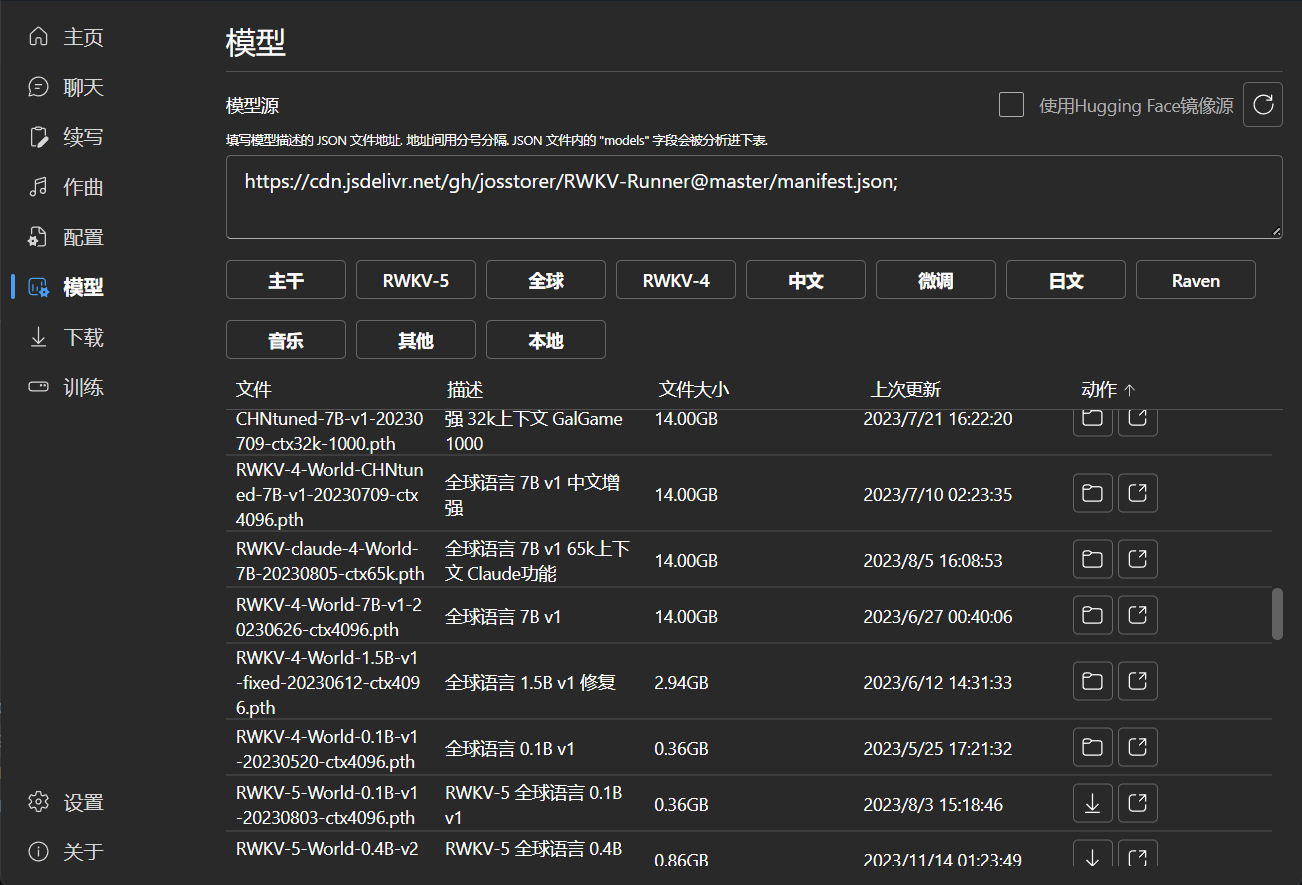
### 模型管理
|
||||
|
||||

|
||||
|
||||
|
||||
### 下载管理
|
||||
|
||||
|
||||
@@ -1,6 +1,6 @@
|
||||
import io
|
||||
import global_var
|
||||
from fastapi import APIRouter, HTTPException, status
|
||||
from fastapi import APIRouter, HTTPException, UploadFile, status
|
||||
from starlette.responses import StreamingResponse
|
||||
from pydantic import BaseModel
|
||||
from utils.midi import *
|
||||
@@ -33,6 +33,16 @@ def text_to_midi(body: TextToMidiBody):
|
||||
return StreamingResponse(mid_data, media_type="audio/midi")
|
||||
|
||||
|
||||
@router.post("/midi-to-text", tags=["MIDI"])
|
||||
async def midi_to_text(file_data: UploadFile):
|
||||
vocab_config = "backend-python/utils/midi_vocab_config.json"
|
||||
cfg = VocabConfig.from_json(vocab_config)
|
||||
mid = mido.MidiFile(file=file_data.file)
|
||||
text = convert_midi_to_str(cfg, mid)
|
||||
|
||||
return {"text": text}
|
||||
|
||||
|
||||
class TxtToMidiBody(BaseModel):
|
||||
txt_path: str
|
||||
midi_path: str
|
||||
|
||||
@@ -256,7 +256,7 @@
|
||||
"Insert default system prompt at the beginning": "最初にデフォルトのシステムプロンプトを挿入",
|
||||
"Format Content": "内容フォーマットの規格化",
|
||||
"Add An Attachment (Accepts pdf, txt)": "添付ファイルを追加 (pdf, txtを受け付けます)",
|
||||
"Uploading Attachment": "添付ファイルアップロード中",
|
||||
"Processing Attachment": "添付ファイルを処理中",
|
||||
"Remove Attachment": "添付ファイルを削除",
|
||||
"The content of file": "ファイル",
|
||||
"is as follows. When replying to me, consider the file content and respond accordingly:": "の内容は以下の通りです。私に返信する際は、ファイルの内容を考慮して適切に返信してください:",
|
||||
@@ -311,5 +311,7 @@
|
||||
"CN": "中国語",
|
||||
"JP": "日本語",
|
||||
"Music": "音楽",
|
||||
"Other": "その他"
|
||||
"Other": "その他",
|
||||
"Import MIDI": "MIDIをインポート",
|
||||
"Current Instrument": "現在の楽器"
|
||||
}
|
||||
@@ -256,7 +256,7 @@
|
||||
"Insert default system prompt at the beginning": "在开头自动插入默认系统提示",
|
||||
"Format Content": "规范格式",
|
||||
"Add An Attachment (Accepts pdf, txt)": "添加一个附件 (支持pdf, txt)",
|
||||
"Uploading Attachment": "正在上传附件",
|
||||
"Processing Attachment": "正在处理附件",
|
||||
"Remove Attachment": "移除附件",
|
||||
"The content of file": "文件",
|
||||
"is as follows. When replying to me, consider the file content and respond accordingly:": "内容如下。回复时考虑文件内容并做出相应回复:",
|
||||
@@ -311,5 +311,7 @@
|
||||
"CN": "中文",
|
||||
"JP": "日文",
|
||||
"Music": "音乐",
|
||||
"Other": "其他"
|
||||
"Other": "其他",
|
||||
"Import MIDI": "导入MIDI",
|
||||
"Current Instrument": "当前乐器"
|
||||
}
|
||||
@@ -7,6 +7,7 @@ import { v4 as uuid } from 'uuid';
|
||||
import {
|
||||
Add16Regular,
|
||||
ArrowAutofitWidth20Regular,
|
||||
ArrowUpload16Regular,
|
||||
Delete16Regular,
|
||||
MusicNote220Regular,
|
||||
Pause16Regular,
|
||||
@@ -17,19 +18,25 @@ import {
|
||||
} from '@fluentui/react-icons';
|
||||
import { Button, Card, DialogTrigger, Slider, Text, Tooltip } from '@fluentui/react-components';
|
||||
import { useWindowSize } from 'usehooks-ts';
|
||||
import commonStore from '../../stores/commonStore';
|
||||
import commonStore, { ModelStatus } from '../../stores/commonStore';
|
||||
import classnames from 'classnames';
|
||||
import {
|
||||
InstrumentType,
|
||||
InstrumentTypeNameMap,
|
||||
InstrumentTypeTokenMap,
|
||||
MidiMessage,
|
||||
tracksMinimalTotalTime
|
||||
} from '../../types/composition';
|
||||
import { toast } from 'react-toastify';
|
||||
import { ToastOptions } from 'react-toastify/dist/types';
|
||||
import { flushMidiRecordingContent, refreshTracksTotalTime } from '../../utils';
|
||||
import { PlayNote } from '../../../wailsjs/go/backend_golang/App';
|
||||
import { t } from 'i18next';
|
||||
import {
|
||||
absPathAsset,
|
||||
flushMidiRecordingContent,
|
||||
getMidiRawContentMainInstrument,
|
||||
getMidiRawContentTime,
|
||||
getServerRoot,
|
||||
refreshTracksTotalTime
|
||||
} from '../../utils';
|
||||
import { OpenOpenFileDialog, PlayNote } from '../../../wailsjs/go/backend_golang/App';
|
||||
|
||||
const snapValue = 25;
|
||||
const minimalMoveTime = 8; // 1000/125=8ms wait_events=125
|
||||
@@ -47,52 +54,62 @@ const pixelFix = 0.5;
|
||||
const topToArrowIcon = 19;
|
||||
const arrowIconToTracks = 23;
|
||||
|
||||
type TrackProps = {
|
||||
id: string;
|
||||
right: number;
|
||||
scale: number;
|
||||
isSelected: boolean;
|
||||
onSelect: (id: string) => void;
|
||||
};
|
||||
|
||||
const displayCurrentInstrumentType = () => {
|
||||
const displayPanelId = 'instrument_panel_id';
|
||||
const content: React.ReactNode =
|
||||
<div className="flex gap-2 items-center">
|
||||
{InstrumentTypeNameMap.map((name, i) =>
|
||||
<Text key={name} style={{ whiteSpace: 'nowrap' }}
|
||||
className={commonStore.instrumentType === i ? 'text-blue-600' : ''}
|
||||
weight={commonStore.instrumentType === i ? 'bold' : 'regular'}
|
||||
size={commonStore.instrumentType === i ? 300 : 100}
|
||||
>{t(name)}</Text>)}
|
||||
</div>;
|
||||
const options: ToastOptions = {
|
||||
type: 'default',
|
||||
autoClose: 2000,
|
||||
toastId: displayPanelId,
|
||||
position: 'top-left',
|
||||
style: {
|
||||
width: 'fit-content'
|
||||
}
|
||||
};
|
||||
if (toast.isActive(displayPanelId))
|
||||
toast.update(displayPanelId, {
|
||||
render: content,
|
||||
...options
|
||||
});
|
||||
else
|
||||
toast(content, options);
|
||||
};
|
||||
|
||||
const velocityToBin = (velocity: number) => {
|
||||
velocity = Math.max(0, Math.min(velocity, velocityEvents - 1));
|
||||
const binsize = velocityEvents / (velocityBins - 1);
|
||||
return Math.ceil((velocityEvents * ((Math.pow(velocityExp, (velocity / velocityEvents)) - 1.0) / (velocityExp - 1.0))) / binsize);
|
||||
};
|
||||
|
||||
const binToVelocity = (bin: number) => {
|
||||
const binsize = velocityEvents / (velocityBins - 1);
|
||||
return Math.max(0, Math.ceil(velocityEvents * (Math.log(((velocityExp - 1) * binsize * bin) / velocityEvents + 1) / Math.log(velocityExp)) - 1));
|
||||
};
|
||||
|
||||
const tokenToMidiMessage = (token: string): MidiMessage | null => {
|
||||
if (token.startsWith('<')) return null;
|
||||
if (token.startsWith('t') && !token.startsWith('t:')) {
|
||||
return {
|
||||
messageType: 'ElapsedTime',
|
||||
value: parseInt(token.substring(1)) * minimalMoveTime,
|
||||
channel: 0,
|
||||
note: 0,
|
||||
velocity: 0,
|
||||
control: 0,
|
||||
instrument: 0
|
||||
};
|
||||
}
|
||||
const instrument: InstrumentType = InstrumentTypeTokenMap.findIndex(t => token.startsWith(t + ':'));
|
||||
if (instrument >= 0) {
|
||||
const parts = token.split(':');
|
||||
if (parts.length !== 3) return null;
|
||||
const note = parseInt(parts[1], 16);
|
||||
const velocity = parseInt(parts[2], 16);
|
||||
if (velocity < 0 || velocity > 127) return null;
|
||||
if (velocity === 0) return {
|
||||
messageType: 'NoteOff',
|
||||
note: note,
|
||||
instrument: instrument,
|
||||
channel: 0,
|
||||
velocity: 0,
|
||||
control: 0,
|
||||
value: 0
|
||||
};
|
||||
return {
|
||||
messageType: 'NoteOn',
|
||||
note: note,
|
||||
velocity: binToVelocity(velocity),
|
||||
instrument: instrument,
|
||||
channel: 0,
|
||||
control: 0,
|
||||
value: 0
|
||||
} as MidiMessage;
|
||||
}
|
||||
return null;
|
||||
};
|
||||
|
||||
const midiMessageToToken = (msg: MidiMessage) => {
|
||||
if (msg.messageType === 'NoteOn' || msg.messageType === 'NoteOff') {
|
||||
const instrument = InstrumentTypeTokenMap[commonStore.instrumentType];
|
||||
const instrument = InstrumentTypeTokenMap[msg.instrument];
|
||||
const note = msg.note.toString(16);
|
||||
const velocity = velocityToBin(msg.velocity).toString(16);
|
||||
return `${instrument}:${note}:${velocity} `;
|
||||
@@ -116,7 +133,6 @@ let dropRecordingTime = false;
|
||||
export const midiMessageHandler = async (data: MidiMessage) => {
|
||||
if (data.messageType === 'ControlChange') {
|
||||
commonStore.setInstrumentType(Math.round(data.value / 127 * (InstrumentTypeNameMap.length - 1)));
|
||||
displayCurrentInstrumentType();
|
||||
return;
|
||||
}
|
||||
if (commonStore.recordingTrackId) {
|
||||
@@ -136,6 +152,14 @@ export const midiMessageHandler = async (data: MidiMessage) => {
|
||||
}
|
||||
};
|
||||
|
||||
type TrackProps = {
|
||||
id: string;
|
||||
right: number;
|
||||
scale: number;
|
||||
isSelected: boolean;
|
||||
onSelect: (id: string) => void;
|
||||
};
|
||||
|
||||
const Track: React.FC<TrackProps> = observer(({
|
||||
id,
|
||||
right,
|
||||
@@ -364,6 +388,7 @@ const AudiotrackEditor: FC<{ setPrompt: (prompt: string) => void }> = observer((
|
||||
<div key={track.id} className="flex gap-2 pb-1 border-b">
|
||||
<div className="flex gap-1 border-r h-7">
|
||||
<ToolTipButton desc={commonStore.recordingTrackId === track.id ? t('Stop') : t('Record')}
|
||||
disabled={commonStore.platform === 'web'}
|
||||
icon={commonStore.recordingTrackId === track.id ? <Stop16Filled /> : <Record16Regular />}
|
||||
size="small" shape="circular" appearance="subtle"
|
||||
onClick={() => {
|
||||
@@ -422,20 +447,76 @@ const AudiotrackEditor: FC<{ setPrompt: (prompt: string) => void }> = observer((
|
||||
</div>
|
||||
</div>)}
|
||||
<div className="flex justify-between items-center">
|
||||
<Button icon={<Add16Regular />} size="small" shape="circular"
|
||||
appearance="subtle"
|
||||
onClick={() => {
|
||||
commonStore.setTracks([...commonStore.tracks, {
|
||||
id: uuid(),
|
||||
mainInstrument: '',
|
||||
content: '',
|
||||
rawContent: [],
|
||||
offsetTime: 0,
|
||||
contentTime: 0
|
||||
}]);
|
||||
}}>
|
||||
{t('New Track')}
|
||||
</Button>
|
||||
<div className="flex gap-1">
|
||||
<Button icon={<Add16Regular />} size="small" shape="circular"
|
||||
appearance="subtle"
|
||||
disabled={commonStore.platform === 'web'}
|
||||
onClick={() => {
|
||||
commonStore.setTracks([...commonStore.tracks, {
|
||||
id: uuid(),
|
||||
mainInstrument: '',
|
||||
content: '',
|
||||
rawContent: [],
|
||||
offsetTime: 0,
|
||||
contentTime: 0
|
||||
}]);
|
||||
}}>
|
||||
{t('New Track')}
|
||||
</Button>
|
||||
<Button icon={<ArrowUpload16Regular />} size="small" shape="circular"
|
||||
appearance="subtle"
|
||||
onClick={() => {
|
||||
if (commonStore.status.status === ModelStatus.Offline && !commonStore.settings.apiUrl && commonStore.platform !== 'web') {
|
||||
toast(t('Please click the button in the top right corner to start the model'), { type: 'warning' });
|
||||
return;
|
||||
}
|
||||
|
||||
OpenOpenFileDialog('*.mid').then(async filePath => {
|
||||
if (!filePath)
|
||||
return;
|
||||
|
||||
let blob: Blob;
|
||||
if (commonStore.platform === 'web')
|
||||
blob = (filePath as unknown as { blob: Blob }).blob;
|
||||
else
|
||||
blob = await fetch(absPathAsset(filePath)).then(r => r.blob());
|
||||
const bodyForm = new FormData();
|
||||
bodyForm.append('file_data', blob);
|
||||
fetch(getServerRoot(commonStore.getCurrentModelConfig().apiParameters.apiPort) + '/midi-to-text', {
|
||||
method: 'POST',
|
||||
body: bodyForm
|
||||
}).then(async r => {
|
||||
if (r.status === 200) {
|
||||
const text = (await r.json()).text as string;
|
||||
const rawContent = text.split(' ').map(tokenToMidiMessage).filter(m => m) as MidiMessage[];
|
||||
const tracks = commonStore.tracks.slice();
|
||||
|
||||
tracks.push({
|
||||
id: uuid(),
|
||||
mainInstrument: getMidiRawContentMainInstrument(rawContent),
|
||||
content: text,
|
||||
rawContent: rawContent,
|
||||
offsetTime: 0,
|
||||
contentTime: getMidiRawContentTime(rawContent)
|
||||
});
|
||||
commonStore.setTracks(tracks);
|
||||
refreshTracksTotalTime();
|
||||
} else {
|
||||
toast(r.statusText + '\n' + (await r.text()), {
|
||||
type: 'error'
|
||||
});
|
||||
}
|
||||
}
|
||||
).catch(e => {
|
||||
toast(t('Error') + ' - ' + (e.message || e), { type: 'error', autoClose: 2500 });
|
||||
});
|
||||
}).catch(e => {
|
||||
toast(t('Error') + ' - ' + (e.message || e), { type: 'error', autoClose: 2500 });
|
||||
});
|
||||
}}>
|
||||
{t('Import MIDI')}
|
||||
</Button>
|
||||
</div>
|
||||
<Text size={100}>
|
||||
{t('Select a track to preview the content')}
|
||||
</Text>
|
||||
@@ -455,6 +536,18 @@ const AudiotrackEditor: FC<{ setPrompt: (prompt: string) => void }> = observer((
|
||||
</div>
|
||||
</Card>
|
||||
}
|
||||
{
|
||||
commonStore.platform !== 'web' &&
|
||||
<div className="flex gap-2 items-end mx-auto">
|
||||
{t('Current Instrument') + ':'}
|
||||
{InstrumentTypeNameMap.map((name, i) =>
|
||||
<Text key={name} style={{ whiteSpace: 'nowrap' }}
|
||||
className={commonStore.instrumentType === i ? 'text-blue-600' : ''}
|
||||
weight={commonStore.instrumentType === i ? 'bold' : 'regular'}
|
||||
size={commonStore.instrumentType === i ? 300 : 100}
|
||||
>{t(name)}</Text>)}
|
||||
</div>
|
||||
}
|
||||
<DialogTrigger disableButtonEnhancement>
|
||||
<Button icon={<MusicNote220Regular />} style={{ minHeight: '32px' }} onClick={() => {
|
||||
flushMidiRecordingContent();
|
||||
@@ -494,7 +587,7 @@ const AudiotrackEditor: FC<{ setPrompt: (prompt: string) => void }> = observer((
|
||||
}
|
||||
}
|
||||
}
|
||||
const result = ('<pad> ' + globalMessages.map(m => midiMessageToToken(m)).join('')).trim();
|
||||
const result = ('<pad> ' + globalMessages.map(midiMessageToToken).join('')).trim();
|
||||
commonStore.setCompositionSubmittedPrompt(result);
|
||||
setPrompt(result);
|
||||
}}>
|
||||
|
||||
@@ -553,7 +553,7 @@ const ChatPanel: FC = observer(() => {
|
||||
{!commonStore.currentTempAttachment ?
|
||||
<ToolTipButton
|
||||
desc={commonStore.attachmentUploading ?
|
||||
t('Uploading Attachment') :
|
||||
t('Processing Attachment') :
|
||||
t('Add An Attachment (Accepts pdf, txt)')}
|
||||
icon={commonStore.attachmentUploading ?
|
||||
<ArrowClockwise16Regular className="animate-spin" />
|
||||
@@ -567,7 +567,7 @@ const ChatPanel: FC = observer(() => {
|
||||
const setUploading = () => commonStore.setAttachmentUploading(true);
|
||||
// actually, status of web platform is always Offline
|
||||
if (commonStore.platform === 'web' || commonStore.status.status === ModelStatus.Offline || currentConfig.modelParameters.device === 'WebGPU') {
|
||||
webOpenOpenFileDialog({ filterPattern, fnStartLoading: setUploading }).then(webReturn => {
|
||||
webOpenOpenFileDialog(filterPattern, setUploading).then(webReturn => {
|
||||
if (webReturn.content)
|
||||
commonStore.setCurrentTempAttachment(
|
||||
{
|
||||
|
||||
@@ -250,32 +250,36 @@ const CompositionPanel: FC = observer(() => {
|
||||
}} />
|
||||
} />
|
||||
<div className="grow" />
|
||||
<Checkbox className="select-none"
|
||||
size="large" label={t('Use Local Sound Font')} checked={params.useLocalSoundFont}
|
||||
onChange={async (_, data) => {
|
||||
if (data.checked) {
|
||||
if (!await FileExists('assets/sound-font/accordion/instrument.json')) {
|
||||
toast(t('Failed to load local sound font, please check if the files exist - assets/sound-font'),
|
||||
{ type: 'warning' });
|
||||
return;
|
||||
{
|
||||
commonStore.platform !== 'web' &&
|
||||
<Checkbox className="select-none"
|
||||
size="large" label={t('Use Local Sound Font')} checked={params.useLocalSoundFont}
|
||||
onChange={async (_, data) => {
|
||||
if (data.checked) {
|
||||
if (!await FileExists('assets/sound-font/accordion/instrument.json')) {
|
||||
toast(t('Failed to load local sound font, please check if the files exist - assets/sound-font'),
|
||||
{ type: 'warning' });
|
||||
return;
|
||||
}
|
||||
}
|
||||
}
|
||||
setParams({
|
||||
useLocalSoundFont: data.checked as boolean
|
||||
});
|
||||
setSoundFont();
|
||||
}} />
|
||||
setParams({
|
||||
useLocalSoundFont: data.checked as boolean
|
||||
});
|
||||
setSoundFont();
|
||||
}} />
|
||||
}
|
||||
<Checkbox className="select-none"
|
||||
size="large" label={t('Auto Play At The End')} checked={params.autoPlay} onChange={(_, data) => {
|
||||
setParams({
|
||||
autoPlay: data.checked as boolean
|
||||
});
|
||||
}} />
|
||||
{commonStore.platform !== 'web' &&
|
||||
<Labeled flex breakline label={t('MIDI Input')}
|
||||
desc={t('Select the MIDI input device to be used.')}
|
||||
content={
|
||||
<div className="flex flex-col gap-1">
|
||||
<Labeled flex breakline label={t('MIDI Input')}
|
||||
desc={t('Select the MIDI input device to be used.')}
|
||||
content={
|
||||
<div className="flex flex-col gap-1">
|
||||
{
|
||||
commonStore.platform !== 'web' &&
|
||||
<Dropdown style={{ minWidth: 0 }}
|
||||
value={(commonStore.activeMidiDeviceIndex === -1 || !(commonStore.activeMidiDeviceIndex in commonStore.midiPorts))
|
||||
? t('None')!
|
||||
@@ -299,10 +303,10 @@ const CompositionPanel: FC = observer(() => {
|
||||
<Option key={i} value={i.toString()}>{p.name}</Option>)
|
||||
}
|
||||
</Dropdown>
|
||||
<AudiotrackButton setPrompt={setPrompt} />
|
||||
</div>
|
||||
} />
|
||||
}
|
||||
}
|
||||
<AudiotrackButton setPrompt={setPrompt} />
|
||||
</div>
|
||||
} />
|
||||
</div>
|
||||
<div className="flex justify-between gap-2">
|
||||
<ToolTipButton desc={t('Regenerate')} icon={<ArrowSync20Regular />} onClick={() => {
|
||||
|
||||
@@ -22,7 +22,7 @@ import { DownloadStatus } from '../types/downloads';
|
||||
import { ModelSourceItem } from '../types/models';
|
||||
import { Language, Languages, SettingsType } from '../types/settings';
|
||||
import { DataProcessParameters, LoraFinetuneParameters } from '../types/train';
|
||||
import { InstrumentTypeNameMap, tracksMinimalTotalTime } from '../types/composition';
|
||||
import { InstrumentTypeNameMap, MidiMessage, tracksMinimalTotalTime } from '../types/composition';
|
||||
import logo from '../assets/images/logo.png';
|
||||
import { Preset } from '../types/presets';
|
||||
import { botName, Conversation, MessageType, userName } from '../types/chat';
|
||||
@@ -513,34 +513,39 @@ export function refreshTracksTotalTime() {
|
||||
commonStore.setTrackTotalTime(totalTime);
|
||||
}
|
||||
|
||||
export function getMidiRawContentTime(rawContent: MidiMessage[]) {
|
||||
return rawContent.reduce((sum, current) =>
|
||||
sum + (current.messageType === 'ElapsedTime' ? current.value : 0)
|
||||
, 0);
|
||||
}
|
||||
|
||||
export function getMidiRawContentMainInstrument(rawContent: MidiMessage[]) {
|
||||
const sortedInstrumentFrequency = Object.entries(rawContent
|
||||
.filter(c => c.messageType === 'NoteOn')
|
||||
.map(c => c.instrument)
|
||||
.reduce((frequencyCount, current) => (frequencyCount[current] = (frequencyCount[current] || 0) + 1, frequencyCount)
|
||||
, {} as {
|
||||
[key: string]: number
|
||||
}))
|
||||
.sort((a, b) => b[1] - a[1]);
|
||||
let mainInstrument: string = '';
|
||||
if (sortedInstrumentFrequency.length > 0)
|
||||
mainInstrument = InstrumentTypeNameMap[Number(sortedInstrumentFrequency[0][0])];
|
||||
return mainInstrument;
|
||||
}
|
||||
|
||||
export function flushMidiRecordingContent() {
|
||||
const recordingTrackIndex = commonStore.tracks.findIndex(t => t.id === commonStore.recordingTrackId);
|
||||
if (recordingTrackIndex >= 0) {
|
||||
const recordingTrack = commonStore.tracks[recordingTrackIndex];
|
||||
const tracks = commonStore.tracks.slice();
|
||||
const contentTime = commonStore.recordingRawContent
|
||||
.reduce((sum, current) =>
|
||||
sum + (current.messageType === 'ElapsedTime' ? current.value : 0)
|
||||
, 0);
|
||||
|
||||
const sortedInstrumentFrequency = Object.entries(commonStore.recordingRawContent
|
||||
.filter(c => c.messageType === 'NoteOn')
|
||||
.map(c => c.instrument)
|
||||
.reduce((frequencyCount, current) => (frequencyCount[current] = (frequencyCount[current] || 0) + 1, frequencyCount)
|
||||
, {} as {
|
||||
[key: string]: number
|
||||
}))
|
||||
.sort((a, b) => b[1] - a[1]);
|
||||
let mainInstrument: string = '';
|
||||
if (sortedInstrumentFrequency.length > 0)
|
||||
mainInstrument = InstrumentTypeNameMap[Number(sortedInstrumentFrequency[0][0])];
|
||||
|
||||
tracks[recordingTrackIndex] = {
|
||||
...recordingTrack,
|
||||
content: commonStore.recordingContent,
|
||||
rawContent: commonStore.recordingRawContent,
|
||||
contentTime: contentTime,
|
||||
mainInstrument: mainInstrument
|
||||
contentTime: getMidiRawContentTime(commonStore.recordingRawContent),
|
||||
mainInstrument: getMidiRawContentMainInstrument(commonStore.recordingRawContent)
|
||||
};
|
||||
commonStore.setTracks(tracks);
|
||||
refreshTracksTotalTime();
|
||||
|
||||
@@ -1,12 +1,17 @@
|
||||
import { getDocument, GlobalWorkerOptions, PDFDocumentProxy } from 'pdfjs-dist';
|
||||
import { TextItem } from 'pdfjs-dist/types/src/display/api';
|
||||
|
||||
export function webOpenOpenFileDialog({ filterPattern, fnStartLoading }: { filterPattern: string, fnStartLoading: Function | null }): Promise<{ blob: Blob, content?: string }> {
|
||||
export function webOpenOpenFileDialog(filterPattern: string, fnStartLoading: Function | undefined): Promise<{
|
||||
blob: Blob,
|
||||
content?: string
|
||||
}> {
|
||||
return new Promise((resolve, reject) => {
|
||||
const input = document.createElement('input');
|
||||
input.type = 'file';
|
||||
input.accept = filterPattern
|
||||
.replaceAll('*.txt', 'text/plain')
|
||||
.replace('*.midi', 'audio/midi')
|
||||
.replace('*.mid', 'audio/midi')
|
||||
.replaceAll('*.', 'application/')
|
||||
.replaceAll(';', ',');
|
||||
|
||||
@@ -15,7 +20,7 @@ export function webOpenOpenFileDialog({ filterPattern, fnStartLoading }: { filte
|
||||
const file: Blob = e.target?.files[0];
|
||||
if (fnStartLoading && typeof fnStartLoading === 'function')
|
||||
fnStartLoading();
|
||||
if (!GlobalWorkerOptions.workerSrc)
|
||||
if (!GlobalWorkerOptions.workerSrc && file.type === 'application/pdf')
|
||||
// @ts-ignore
|
||||
GlobalWorkerOptions.workerSrc = await import('pdfjs-dist/build/pdf.worker.min.mjs');
|
||||
if (file.type === 'text/plain') {
|
||||
|
||||
14
go.mod
14
go.mod
@@ -9,13 +9,14 @@ require (
|
||||
github.com/minio/selfupdate v0.6.0
|
||||
github.com/nyaosorg/go-windows-su v0.2.1
|
||||
github.com/ubuntu/gowsl v0.0.0-20230615094051-94945650cc1e
|
||||
github.com/wailsapp/wails/v2 v2.6.0
|
||||
github.com/wailsapp/wails/v2 v2.7.1
|
||||
)
|
||||
|
||||
require (
|
||||
aead.dev/minisign v0.2.0 // indirect
|
||||
github.com/bep/debounce v1.2.1 // indirect
|
||||
github.com/go-ole/go-ole v1.2.6 // indirect
|
||||
github.com/godbus/dbus/v5 v5.1.0 // indirect
|
||||
github.com/google/uuid v1.3.0 // indirect
|
||||
github.com/jchv/go-winloader v0.0.0-20210711035445-715c2860da7e // indirect
|
||||
github.com/labstack/echo/v4 v4.10.2 // indirect
|
||||
@@ -23,6 +24,7 @@ require (
|
||||
github.com/leaanthony/go-ansi-parser v1.6.0 // indirect
|
||||
github.com/leaanthony/gosod v1.0.3 // indirect
|
||||
github.com/leaanthony/slicer v1.6.0 // indirect
|
||||
github.com/leaanthony/u v1.1.0 // indirect
|
||||
github.com/mattn/go-colorable v0.1.13 // indirect
|
||||
github.com/mattn/go-isatty v0.0.19 // indirect
|
||||
github.com/pkg/browser v0.0.0-20210911075715-681adbf594b8 // indirect
|
||||
@@ -34,11 +36,11 @@ require (
|
||||
github.com/ubuntu/decorate v0.0.0-20230125165522-2d5b0a9bb117 // indirect
|
||||
github.com/valyala/bytebufferpool v1.0.0 // indirect
|
||||
github.com/valyala/fasttemplate v1.2.2 // indirect
|
||||
github.com/wailsapp/go-webview2 v1.0.1 // indirect
|
||||
github.com/wailsapp/go-webview2 v1.0.10 // indirect
|
||||
github.com/wailsapp/mimetype v1.4.1 // indirect
|
||||
golang.org/x/crypto v0.9.0 // indirect
|
||||
golang.org/x/crypto v0.14.0 // indirect
|
||||
golang.org/x/exp v0.0.0-20230522175609-2e198f4a06a1 // indirect
|
||||
golang.org/x/net v0.10.0 // indirect
|
||||
golang.org/x/sys v0.9.0 // indirect
|
||||
golang.org/x/text v0.9.0 // indirect
|
||||
golang.org/x/net v0.17.0 // indirect
|
||||
golang.org/x/sys v0.13.0 // indirect
|
||||
golang.org/x/text v0.13.0 // indirect
|
||||
)
|
||||
|
||||
28
go.sum
28
go.sum
@@ -12,6 +12,8 @@ github.com/fsnotify/fsnotify v1.6.0 h1:n+5WquG0fcWoWp6xPWfHdbskMCQaFnG6PfBrh1Ky4
|
||||
github.com/fsnotify/fsnotify v1.6.0/go.mod h1:sl3t1tCWJFWoRz9R8WJCbQihKKwmorjAbSClcnxKAGw=
|
||||
github.com/go-ole/go-ole v1.2.6 h1:/Fpf6oFPoeFik9ty7siob0G6Ke8QvQEuVcuChpwXzpY=
|
||||
github.com/go-ole/go-ole v1.2.6/go.mod h1:pprOEPIfldk/42T2oK7lQ4v4JSDwmV0As9GaiUsvbm0=
|
||||
github.com/godbus/dbus/v5 v5.1.0 h1:4KLkAxT3aOY8Li4FRJe/KvhoNFFxo0m6fNuFUO8QJUk=
|
||||
github.com/godbus/dbus/v5 v5.1.0/go.mod h1:xhWf0FNVPg57R7Z0UbKHbJfkEywrmjJnf7w5xrFpKfA=
|
||||
github.com/google/uuid v1.3.0 h1:t6JiXgmwXMjEs8VusXIJk2BXHsn+wx8BZdTaoZ5fu7I=
|
||||
github.com/google/uuid v1.3.0/go.mod h1:TIyPZe4MgqvfeYDBFedMoGGpEw/LqOeaOT+nhxU+yHo=
|
||||
github.com/jchv/go-winloader v0.0.0-20210711035445-715c2860da7e h1:Q3+PugElBCf4PFpxhErSzU3/PY5sFL5Z6rfv4AbGAck=
|
||||
@@ -29,6 +31,8 @@ github.com/leaanthony/gosod v1.0.3/go.mod h1:BJ2J+oHsQIyIQpnLPjnqFGTMnOZXDbvWtRC
|
||||
github.com/leaanthony/slicer v1.5.0/go.mod h1:FwrApmf8gOrpzEWM2J/9Lh79tyq8KTX5AzRtwV7m4AY=
|
||||
github.com/leaanthony/slicer v1.6.0 h1:1RFP5uiPJvT93TAHi+ipd3NACobkW53yUiBqZheE/Js=
|
||||
github.com/leaanthony/slicer v1.6.0/go.mod h1:o/Iz29g7LN0GqH3aMjWAe90381nyZlDNquK+mtH2Fj8=
|
||||
github.com/leaanthony/u v1.1.0 h1:2n0d2BwPVXSUq5yhe8lJPHdxevE2qK5G99PMStMZMaI=
|
||||
github.com/leaanthony/u v1.1.0/go.mod h1:9+o6hejoRljvZ3BzdYlVL0JYCwtnAsVuN9pVTQcaRfI=
|
||||
github.com/matryer/is v1.4.0 h1:sosSmIWwkYITGrxZ25ULNDeKiMNzFSr4V/eqBQP0PeE=
|
||||
github.com/matryer/is v1.4.0/go.mod h1:8I/i5uYgLzgsgEloJE1U6xx5HkBQpAZvepWuujKwMRU=
|
||||
github.com/mattn/go-colorable v0.1.11/go.mod h1:u5H1YNBxpqRaxsYJYSkiCWKzEfiAb1Gb520KVy5xxl4=
|
||||
@@ -71,24 +75,24 @@ github.com/valyala/bytebufferpool v1.0.0/go.mod h1:6bBcMArwyJ5K/AmCkWv1jt77kVWyC
|
||||
github.com/valyala/fasttemplate v1.2.1/go.mod h1:KHLXt3tVN2HBp8eijSv/kGJopbvo7S+qRAEEKiv+SiQ=
|
||||
github.com/valyala/fasttemplate v1.2.2 h1:lxLXG0uE3Qnshl9QyaK6XJxMXlQZELvChBOCmQD0Loo=
|
||||
github.com/valyala/fasttemplate v1.2.2/go.mod h1:KHLXt3tVN2HBp8eijSv/kGJopbvo7S+qRAEEKiv+SiQ=
|
||||
github.com/wailsapp/go-webview2 v1.0.1 h1:dEJIeEApW/MhO2tTMISZBFZPuW7kwrFA1NtgFB1z1II=
|
||||
github.com/wailsapp/go-webview2 v1.0.1/go.mod h1:Uk2BePfCRzttBBjFrBmqKGJd41P6QIHeV9kTgIeOZNo=
|
||||
github.com/wailsapp/go-webview2 v1.0.10 h1:PP5Hug6pnQEAhfRzLCoOh2jJaPdrqeRgJKZhyYyDV/w=
|
||||
github.com/wailsapp/go-webview2 v1.0.10/go.mod h1:Uk2BePfCRzttBBjFrBmqKGJd41P6QIHeV9kTgIeOZNo=
|
||||
github.com/wailsapp/mimetype v1.4.1 h1:pQN9ycO7uo4vsUUuPeHEYoUkLVkaRntMnHJxVwYhwHs=
|
||||
github.com/wailsapp/mimetype v1.4.1/go.mod h1:9aV5k31bBOv5z6u+QP8TltzvNGJPmNJD4XlAL3U+j3o=
|
||||
github.com/wailsapp/wails/v2 v2.6.0 h1:EyH0zR/EO6dDiqNy8qU5spaXDfkluiq77xrkabPYD4c=
|
||||
github.com/wailsapp/wails/v2 v2.6.0/go.mod h1:WBG9KKWuw0FKfoepBrr/vRlyTmHaMibWesK3yz6nNiM=
|
||||
github.com/wailsapp/wails/v2 v2.7.1 h1:HAzp2c5ODOzsLC6ZMDVtNOB72ozM7/SJecJPB2Ur+UU=
|
||||
github.com/wailsapp/wails/v2 v2.7.1/go.mod h1:oIJVwwso5fdOgprBYWXBBqtx6PaSvxg8/KTQHNGkadc=
|
||||
golang.org/x/crypto v0.0.0-20190308221718-c2843e01d9a2/go.mod h1:djNgcEr1/C05ACkg1iLfiJU5Ep61QUkGW8qpdssI0+w=
|
||||
golang.org/x/crypto v0.0.0-20210220033148-5ea612d1eb83/go.mod h1:jdWPYTVW3xRLrWPugEBEK3UY2ZEsg3UU495nc5E+M+I=
|
||||
golang.org/x/crypto v0.0.0-20211209193657-4570a0811e8b/go.mod h1:IxCIyHEi3zRg3s0A5j5BB6A9Jmi73HwBIUl50j+osU4=
|
||||
golang.org/x/crypto v0.9.0 h1:LF6fAI+IutBocDJ2OT0Q1g8plpYljMZ4+lty+dsqw3g=
|
||||
golang.org/x/crypto v0.9.0/go.mod h1:yrmDGqONDYtNj3tH8X9dzUun2m2lzPa9ngI6/RUPGR0=
|
||||
golang.org/x/crypto v0.14.0 h1:wBqGXzWJW6m1XrIKlAH0Hs1JJ7+9KBwnIO8v66Q9cHc=
|
||||
golang.org/x/crypto v0.14.0/go.mod h1:MVFd36DqK4CsrnJYDkBA3VC4m2GkXAM0PvzMCn4JQf4=
|
||||
golang.org/x/exp v0.0.0-20230522175609-2e198f4a06a1 h1:k/i9J1pBpvlfR+9QsetwPyERsqu1GIbi967PQMq3Ivc=
|
||||
golang.org/x/exp v0.0.0-20230522175609-2e198f4a06a1/go.mod h1:V1LtkGg67GoY2N1AnLN78QLrzxkLyJw7RJb1gzOOz9w=
|
||||
golang.org/x/net v0.0.0-20190404232315-eb5bcb51f2a3/go.mod h1:t9HGtf8HONx5eT2rtn7q6eTqICYqUVnKs3thJo3Qplg=
|
||||
golang.org/x/net v0.0.0-20210505024714-0287a6fb4125/go.mod h1:9nx3DQGgdP8bBQD5qxJ1jj9UTztislL4KSBs9R2vV5Y=
|
||||
golang.org/x/net v0.0.0-20211112202133-69e39bad7dc2/go.mod h1:9nx3DQGgdP8bBQD5qxJ1jj9UTztislL4KSBs9R2vV5Y=
|
||||
golang.org/x/net v0.10.0 h1:X2//UzNDwYmtCLn7To6G58Wr6f5ahEAQgKNzv9Y951M=
|
||||
golang.org/x/net v0.10.0/go.mod h1:0qNGK6F8kojg2nk9dLZ2mShWaEBan6FAoqfSigmmuDg=
|
||||
golang.org/x/net v0.17.0 h1:pVaXccu2ozPjCXewfr1S7xza/zcXTity9cCdXQYSjIM=
|
||||
golang.org/x/net v0.17.0/go.mod h1:NxSsAGuq816PNPmqtQdLE42eU2Fs7NoRIZrHJAlaCOE=
|
||||
golang.org/x/sys v0.0.0-20190215142949-d0b11bdaac8a/go.mod h1:STP8DvDyc/dI5b8T5hshtkjS+E42TnysNCUPdjciGhY=
|
||||
golang.org/x/sys v0.0.0-20190916202348-b4ddaad3f8a3/go.mod h1:h1NjWce9XRLGQEsW7wpKNCjG9DtNlClVuFLEZdDNbEs=
|
||||
golang.org/x/sys v0.0.0-20191026070338-33540a1f6037/go.mod h1:h1NjWce9XRLGQEsW7wpKNCjG9DtNlClVuFLEZdDNbEs=
|
||||
@@ -105,14 +109,14 @@ golang.org/x/sys v0.0.0-20220715151400-c0bba94af5f8/go.mod h1:oPkhp1MJrh7nUepCBc
|
||||
golang.org/x/sys v0.0.0-20220811171246-fbc7d0a398ab/go.mod h1:oPkhp1MJrh7nUepCBck5+mAzfO9JrbApNNgaTdGDITg=
|
||||
golang.org/x/sys v0.0.0-20220908164124-27713097b956/go.mod h1:oPkhp1MJrh7nUepCBck5+mAzfO9JrbApNNgaTdGDITg=
|
||||
golang.org/x/sys v0.6.0/go.mod h1:oPkhp1MJrh7nUepCBck5+mAzfO9JrbApNNgaTdGDITg=
|
||||
golang.org/x/sys v0.9.0 h1:KS/R3tvhPqvJvwcKfnBHJwwthS11LRhmM5D59eEXa0s=
|
||||
golang.org/x/sys v0.9.0/go.mod h1:oPkhp1MJrh7nUepCBck5+mAzfO9JrbApNNgaTdGDITg=
|
||||
golang.org/x/sys v0.13.0 h1:Af8nKPmuFypiUBjVoU9V20FiaFXOcuZI21p0ycVYYGE=
|
||||
golang.org/x/sys v0.13.0/go.mod h1:oPkhp1MJrh7nUepCBck5+mAzfO9JrbApNNgaTdGDITg=
|
||||
golang.org/x/term v0.0.0-20201117132131-f5c789dd3221/go.mod h1:Nr5EML6q2oocZ2LXRh80K7BxOlk5/8JxuGnuhpl+muw=
|
||||
golang.org/x/term v0.0.0-20201126162022-7de9c90e9dd1/go.mod h1:bj7SfCRtBDWHUb9snDiAeCFNEtKQo2Wmx5Cou7ajbmo=
|
||||
golang.org/x/text v0.3.0/go.mod h1:NqM8EUOU14njkJ3fqMW+pc6Ldnwhi/IjpwHt7yyuwOQ=
|
||||
golang.org/x/text v0.3.6/go.mod h1:5Zoc/QRtKVWzQhOtBMvqHzDpF6irO9z98xDceosuGiQ=
|
||||
golang.org/x/text v0.9.0 h1:2sjJmO8cDvYveuX97RDLsxlyUxLl+GHoLxBiRdHllBE=
|
||||
golang.org/x/text v0.9.0/go.mod h1:e1OnstbJyHTd6l/uOt8jFFHp6TRDWZR/bV3emEE/zU8=
|
||||
golang.org/x/text v0.13.0 h1:ablQoSUd0tRdKxZewP80B+BaqeKJuVhuRxj/dkrun3k=
|
||||
golang.org/x/text v0.13.0/go.mod h1:TvPlkZtksWOMsz7fbANvkp4WM8x/WCo/om8BMLbz+aE=
|
||||
golang.org/x/tools v0.0.0-20180917221912-90fa682c2a6e/go.mod h1:n7NCudcB/nEzxVGmLbDWY5pfWTLqBcC2KZ6jyYvM4mQ=
|
||||
gopkg.in/check.v1 v0.0.0-20161208181325-20d25e280405/go.mod h1:Co6ibVJAznAaIkqp8huTwlJQCZ016jof/cbN4VW5Yz0=
|
||||
gopkg.in/yaml.v3 v3.0.0-20200313102051-9f266ea9e77c/go.mod h1:K4uyk7z7BCEPqu6E+C64Yfv1cQ7kz7rIZviUmN+EgEM=
|
||||
|
||||
@@ -1,5 +1,5 @@
|
||||
{
|
||||
"version": "1.5.8",
|
||||
"version": "1.5.9",
|
||||
"introduction": {
|
||||
"en": "RWKV is an open-source, commercially usable large language model with high flexibility and great potential for development.\n### About This Tool\nThis tool aims to lower the barrier of entry for using large language models, making it accessible to everyone. It provides fully automated dependency and model management. You simply need to click and run, following the instructions, to deploy a local large language model. The tool itself is very compact and only requires a single executable file for one-click deployment.\nAdditionally, this tool offers an interface that is fully compatible with the OpenAI API. This means you can use any ChatGPT client as a client for RWKV, enabling capability expansion beyond just chat functionality.\n### Preset Configuration Rules at the Bottom\nThis tool comes with a series of preset configurations to reduce complexity. The naming rules for each configuration represent the following in order: device - required VRAM/memory - model size - model language.\nFor example, \"GPU-8G-3B-EN\" indicates that this configuration is for a graphics card with 8GB of VRAM, a model size of 3 billion parameters, and it uses an English language model.\nLarger model sizes have higher performance and VRAM requirements. Among configurations with the same model size, those with higher VRAM usage will have faster runtime.\nFor example, if you have 12GB of VRAM but running the \"GPU-12G-7B-EN\" configuration is slow, you can downgrade to \"GPU-8G-3B-EN\" for a significant speed improvement.\n### About RWKV\nRWKV is an RNN with Transformer-level LLM performance, which can also be directly trained like a GPT transformer (parallelizable). And it's 100% attention-free. You only need the hidden state at position t to compute the state at position t+1. You can use the \"GPT\" mode to quickly compute the hidden state for the \"RNN\" mode.<br/>So it's combining the best of RNN and transformer - great performance, fast inference, saves VRAM, fast training, \"infinite\" ctx_len, and free sentence embedding (using the final hidden state).",
|
||||
"zh": "RWKV是一个开源且允许商用的大语言模型,灵活性很高且极具发展潜力。\n### 关于本工具\n本工具旨在降低大语言模型的使用门槛,做到人人可用,本工具提供了全自动化的依赖和模型管理,你只需要直接点击运行,跟随引导,即可完成本地大语言模型的部署,工具本身体积极小,只需要一个exe即可完成一键部署。\n此外,本工具提供了与OpenAI API完全兼容的接口,这意味着你可以把任意ChatGPT客户端用作RWKV的客户端,实现能力拓展,而不局限于聊天。\n### 底部的预设配置规则\n本工具内置了一系列预设配置,以降低使用难度,每个配置名的规则,依次代表着:设备-所需显存/内存-模型规模-模型语言。\n例如,GPU-8G-3B-CN,表示该配置用于显卡,需要8G显存,模型规模为30亿参数,使用的是中文模型。\n模型规模越大,性能要求越高,显存要求也越高,而同样模型规模的配置中,显存占用越高的,运行速度越快。\n例如当你有12G显存,但运行GPU-12G-7B-CN配置速度比较慢,可降级成GPU-8G-3B-CN,将会大幅提速。\n### 关于RWKV\nRWKV是具有Transformer级别LLM性能的RNN,也可以像GPT Transformer一样直接进行训练(可并行化)。而且它是100% attention-free的。你只需在位置t处获得隐藏状态即可计算位置t + 1处的状态。你可以使用“GPT”模式快速计算用于“RNN”模式的隐藏状态。\n因此,它将RNN和Transformer的优点结合起来 - 高性能、快速推理、节省显存、快速训练、“无限”上下文长度以及免费的语句嵌入(使用最终隐藏状态)。"
|
||||
|
||||
Reference in New Issue
Block a user