
13 KiB
Template 模型推理
在基础模型 Pipeline 上启用 Template 模型
我们以基础模型 black-forest-labs/FLUX.2-klein-base-4B 为例,当仅使用基础模型生成图像时
from diffsynth.diffusion.template import TemplatePipeline
from diffsynth.pipelines.flux2_image import Flux2ImagePipeline, ModelConfig
import torch

# Load base model
pipe = Flux2ImagePipeline.from_pretrained(
    torch_dtype=torch.bfloat16,
    device="cuda",
    model_configs=[
        ModelConfig(model_id="black-forest-labs/FLUX.2-klein-4B", origin_file_pattern="text_encoder/*.safetensors"),
        ModelConfig(model_id="black-forest-labs/FLUX.2-klein-base-4B", origin_file_pattern="transformer/*.safetensors"),
        ModelConfig(model_id="black-forest-labs/FLUX.2-klein-4B", origin_file_pattern="vae/diffusion_pytorch_model.safetensors"),
    ],
    tokenizer_config=ModelConfig(model_id="black-forest-labs/FLUX.2-klein-4B", origin_file_pattern="tokenizer/"),
)
# Generate an image
image = pipe(
    prompt="a cat",
    seed=0, cfg_scale=4,
    height=1024, width=1024,
)
image.save("image.png")
Template 模型 DiffSynth-Studio/F2KB4B-Template-Brightness 可以控制模型生成图像的亮度。通过 TemplatePipeline 模型,可从魔搭模型库加载(ModelConfig(model_id="xxx/xxx"))或从本地路径加载(ModelConfig(path="xxx"))。输入 scale=0.8 提高图像的亮度。注意在代码中,需将 pipe 的输入参数转移到 template_pipeline 中,并添加 template_inputs。
# Load Template model
template_pipeline = TemplatePipeline.from_pretrained(
    torch_dtype=torch.bfloat16,
    device="cuda",
    model_configs=[
        ModelConfig(model_id="DiffSynth-Studio/F2KB4B-Template-Brightness")
    ],
)
# Generate an image
image = template_pipeline(
    pipe,
    prompt="a cat",
    seed=0, cfg_scale=4,
    height=1024, width=1024,
    template_inputs=[{"scale": 0.8}],
)
image.save("image_0.8.png")
Template 模型的 CFG 增强
Template 模型可以开启 CFG(Classifier-Free Guidance),使其控制效果更明显。例如模型 DiffSynth-Studio/F2KB4B-Template-Brightness,在 TemplatePipeline 的输入参数中添加 negative_template_inputs 并将其 scale 设置为 0.5,模型就会对比两侧的差异,生成亮度变化更明显的图像。
# Generate an image with CFG
image = template_pipeline(
    pipe,
    prompt="a cat",
    seed=0, cfg_scale=4,
    height=1024, width=1024,
    template_inputs=[{"scale": 0.8}],
    negative_template_inputs=[{"scale": 0.5}],
)
image.save("image_0.8_cfg.png")
低显存支持
Template 模型暂不支持主框架的显存管理,但可以使用惰性加载,仅在需要推理时加载对应的 Template 模型,这在启用多个 Template 模型时可以显著降低显存需求,显存占用峰值为单个 Template 模型的显存占用量。添加参数 lazy_loading=True 即可。
template_pipeline = TemplatePipeline.from_pretrained(
    torch_dtype=torch.bfloat16,
    device="cuda",
    model_configs=[
        ModelConfig(model_id="DiffSynth-Studio/F2KB4B-Template-Brightness")
    ],
    lazy_loading=True,
)
基础模型的 Pipeline 与 Template Pipeline 完全独立,可按需开启显存管理。
当 Template 模型输出的 Template Cache 包含 LoRA 时,需对基础模型的 Pipeline 开启显存管理或开启 LoRA 热加载(使用以下代码),否则会导致 LoRA 权重叠加。
pipe.dit = pipe.enable_lora_hot_loading(pipe.dit)
启用多个 Template 模型
TemplatePipeline 可以加载多个 Template 模型,推理时在 template_inputs 中使用 model_id 区分每个 Template 模型的输入。
对基础模型 Pipeline 存管理,对 Template Pipeline 开启惰性加载后,你可以加载任意多个 Template 模型。
from diffsynth.diffusion.template import TemplatePipeline
from diffsynth.pipelines.flux2_image import Flux2ImagePipeline, ModelConfig
import torch
from PIL import Image

vram_config = {
    "offload_dtype": "disk",
    "offload_device": "disk",
    "onload_dtype": torch.bfloat16,
    "onload_device": "cuda",
    "preparing_dtype": torch.bfloat16,
    "preparing_device": "cuda",
    "computation_dtype": torch.bfloat16,
    "computation_device": "cuda",
}
pipe = Flux2ImagePipeline.from_pretrained(
    torch_dtype=torch.bfloat16,
    device="cuda",
    model_configs=[
        ModelConfig(model_id="black-forest-labs/FLUX.2-klein-base-4B", origin_file_pattern="transformer/*.safetensors", **vram_config),
        ModelConfig(model_id="black-forest-labs/FLUX.2-klein-4B", origin_file_pattern="text_encoder/*.safetensors", **vram_config),
        ModelConfig(model_id="black-forest-labs/FLUX.2-klein-4B", origin_file_pattern="vae/diffusion_pytorch_model.safetensors"),
    ],
    tokenizer_config=ModelConfig(model_id="black-forest-labs/FLUX.2-klein-4B", origin_file_pattern="tokenizer/"),
)
pipe.dit = pipe.enable_lora_hot_loading(pipe.dit)
template = TemplatePipeline.from_pretrained(
    torch_dtype=torch.bfloat16,
    device="cuda",
    lazy_loading=True,
    model_configs=[
        ModelConfig(model_id="DiffSynth-Studio/Template-KleinBase4B-Brightness"),
        ModelConfig(model_id="DiffSynth-Studio/Template-KleinBase4B-ControlNet"),
        ModelConfig(model_id="DiffSynth-Studio/Template-KleinBase4B-Edit"),
        ModelConfig(model_id="DiffSynth-Studio/Template-KleinBase4B-Upscaler"),
        ModelConfig(model_id="DiffSynth-Studio/Template-KleinBase4B-SoftRGB"),
        ModelConfig(model_id="DiffSynth-Studio/Template-KleinBase4B-Sharpness"),
        ModelConfig(model_id="DiffSynth-Studio/Template-KleinBase4B-Inpaint"),
        ModelConfig(model_id="DiffSynth-Studio/Template-KleinBase4B-Aesthetic"),
        ModelConfig(model_id="DiffSynth-Studio/Template-KleinBase4B-PandaMeme"),
    ],
)
超分辨率 + 锐利激发
组合 DiffSynth-Studio/Template-KleinBase4B-Upscaler 和 DiffSynth-Studio/Template-KleinBase4B-Sharpness,可以将模糊图片高清化,同时提高细节部分的清晰度。
image = template(
    pipe,
    prompt="A cat is sitting on a stone.",
    seed=0, cfg_scale=4, num_inference_steps=50,
    template_inputs = [
        {
            "model_id": 3,
            "image": Image.open("data/assets/image_lowres_100.jpg"),
            "prompt": "A cat is sitting on a stone.",
        },
        {
            "model_id": 5,
            "scale": 1,
        },
    ],
    negative_template_inputs = [
        {
            "model_id": 3,
            "image": Image.open("data/assets/image_lowres_100.jpg"),
            "prompt": "",
        },
        {
            "model_id": 5,
            "scale": 0,
        },
    ],
)
image.save("image_Upscaler_Sharpness.png")
| 低清晰度输入 | 高清晰度输出 |
|---|---|
 |
 |
结构控制 + 美学对齐 + 锐利激发
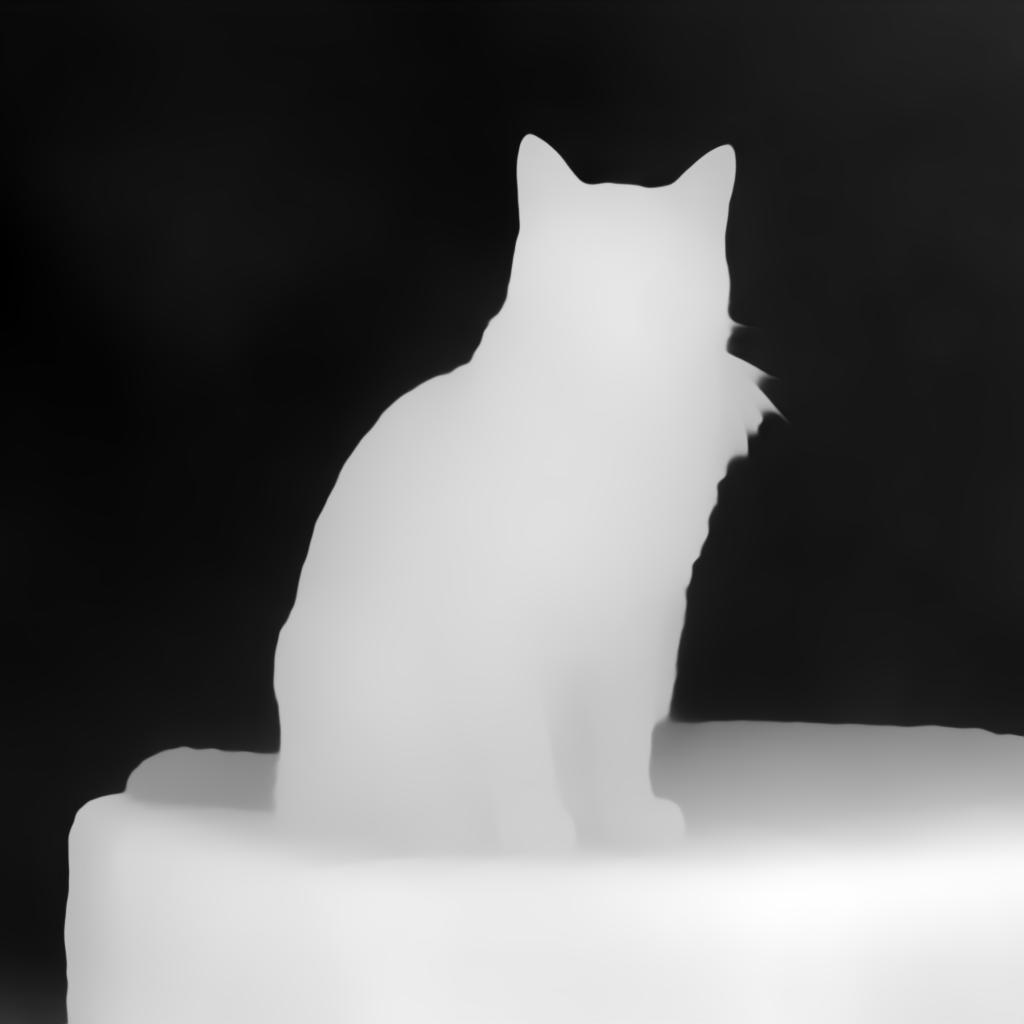
DiffSynth-Studio/Template-KleinBase4B-ControlNet 负责控制构图,DiffSynth-Studio/Template-KleinBase4B-Aesthetic 负责填充细节,DiffSynth-Studio/Template-KleinBase4B-Sharpness 负责保证清晰度,融合三个 Template 模型可以获得精美的画面。
image = template(
    pipe,
    prompt="A cat is sitting on a stone, bathed in bright sunshine.",
    seed=0, cfg_scale=4, num_inference_steps=50,
    template_inputs = [
        {
            "model_id": 1,
            "image": Image.open("data/assets/image_depth.jpg"),
            "prompt": "A cat is sitting on a stone, bathed in bright sunshine.",
        },
        {
            "model_id": 7,
            "lora_ids": list(range(1, 180, 2)),
            "lora_scales": 2.0,
            "merge_type": "mean",
        },
        {
            "model_id": 5,
            "scale": 0.8,
        },
    ],
    negative_template_inputs = [
        {
            "model_id": 1,
            "image": Image.open("data/assets/image_depth.jpg"),
            "prompt": "",
        },
        {
            "model_id": 7,
            "lora_ids": list(range(1, 180, 2)),
            "lora_scales": 2.0,
            "merge_type": "mean",
        },
        {
            "model_id": 5,
            "scale": 0,
        },
    ],
)
image.save("image_Controlnet_Aesthetic_Sharpness.png")
| 结构控制图 | 输出图 |
|---|---|
 |
 |
结构控制 + 图像编辑 + 色彩调节
DiffSynth-Studio/Template-KleinBase4B-ControlNet 负责控制构图,DiffSynth-Studio/Template-KleinBase4B-Edit 负责保留原图的毛发纹理等细节,DiffSynth-Studio/Template-KleinBase4B-SoftRGB 负责控制画面色调,一副极具艺术感的画作被渲染出来。
image = template(
    pipe,
    prompt="A cat is sitting on a stone. Colored ink painting.",
    seed=0, cfg_scale=4, num_inference_steps=50,
    template_inputs = [
        {
            "model_id": 1,
            "image": Image.open("data/assets/image_depth.jpg"),
            "prompt": "A cat is sitting on a stone. Colored ink painting.",
        },
        {
            "model_id": 2,
            "image": Image.open("data/assets/image_reference.jpg"),
            "prompt": "Convert the image style to colored ink painting.",
        },
        {
            "model_id": 4,
            "R": 0.9,
            "G": 0.5,
            "B": 0.3,
        },
    ],
    negative_template_inputs = [
        {
            "model_id": 1,
            "image": Image.open("data/assets/image_depth.jpg"),
            "prompt": "",
        },
        {
            "model_id": 2,
            "image": Image.open("data/assets/image_reference.jpg"),
            "prompt": "",
        },
    ],
)
image.save("image_Controlnet_Edit_SoftRGB.png")
| 结构控制图 | 编辑输入图 | 输出图 |
|---|---|---|
|
 |
 |
亮度控制 + 图像编辑 + 局部重绘
DiffSynth-Studio/Template-KleinBase4B-Brightness 负责生成明亮的画面,DiffSynth-Studio/Template-KleinBase4B-Edit 负责参考原图布局,DiffSynth-Studio/Template-KleinBase4B-Inpaint 负责控制背景不变,生成跨越二次元的画面内容。
image = template(
    pipe,
    prompt="A cat is sitting on a stone. Flat anime style.",
    seed=0, cfg_scale=4, num_inference_steps=50,
    template_inputs = [
        {
            "model_id": 0,
            "scale": 0.6,
        },
        {
            "model_id": 2,
            "image": Image.open("data/assets/image_reference.jpg"),
            "prompt": "Convert the image style to flat anime style.",
        },
        {
            "model_id": 6,
            "image": Image.open("data/assets/image_reference.jpg"),
            "mask": Image.open("data/assets/image_mask_1.jpg"),
            "force_inpaint": True,
        },
    ],
    negative_template_inputs = [
        {
            "model_id": 0,
            "scale": 0.5,
        },
        {
            "model_id": 2,
            "image": Image.open("data/assets/image_reference.jpg"),
            "prompt": "",
        },
        {
            "model_id": 6,
            "image": Image.open("data/assets/image_reference.jpg"),
            "mask": Image.open("data/assets/image_mask_1.jpg"),
        },
    ],
)
image.save("image_Brightness_Edit_Inpaint.png")
| 参考图 | 重绘区域 | 输出图 |
|---|---|---|
|
 |
 |