
14 KiB
Template Model Inference
Enabling Template Models on Base Model Pipelines
Using the base model black-forest-labs/FLUX.2-klein-base-4B as an example, when generating images using only the base model:
from diffsynth.diffusion.template import TemplatePipeline
from diffsynth.pipelines.flux2_image import Flux2ImagePipeline, ModelConfig
import torch

# Load base model
pipe = Flux2ImagePipeline.from_pretrained(
    torch_dtype=torch.bfloat16,
    device="cuda",
    model_configs=[
        ModelConfig(model_id="black-forest-labs/FLUX.2-klein-4B", origin_file_pattern="text_encoder/*.safetensors"),
        ModelConfig(model_id="black-forest-labs/FLUX.2-klein-base-4B", origin_file_pattern="transformer/*.safetensors"),
        ModelConfig(model_id="black-forest-labs/FLUX.2-klein-4B", origin_file_pattern="vae/diffusion_pytorch_model.safetensors"),
    ],
    tokenizer_config=ModelConfig(model_id="black-forest-labs/FLUX.2-klein-4B", origin_file_pattern="tokenizer/"),
)
# Generate an image
image = pipe(
    prompt="a cat",
    seed=0, cfg_scale=4,
    height=1024, width=1024,
)
image.save("image.png")
The Template model DiffSynth-Studio/F2KB4B-Template-Brightness can control image brightness during generation. Through the TemplatePipeline model, it can be loaded from ModelScope (via ModelConfig(model_id="xxx/xxx")) or from a local path (via ModelConfig(path="xxx")). Inputting scale=0.8 increases image brightness. Note that in the code, input parameters for pipe must be transferred to template_pipeline, and template_inputs should be added.
# Load Template model
template_pipeline = TemplatePipeline.from_pretrained(
    torch_dtype=torch.bfloat16,
    device="cuda",
    model_configs=[
        ModelConfig(model_id="DiffSynth-Studio/F2KB4B-Template-Brightness")
    ],
)
# Generate an image
image = template_pipeline(
    pipe,
    prompt="a cat",
    seed=0, cfg_scale=4,
    height=1024, width=1024,
    template_inputs=[{"scale": 0.8}],
)
image.save("image_0.8.png")
CFG Enhancement for Template Models
Template models can enable CFG (Classifier-Free Guidance) to make control effects more pronounced. For example, with the model DiffSynth-Studio/F2KB4B-Template-Brightness, adding negative_template_inputs to the TemplatePipeline input parameters and setting its scale to 0.5 will generate images with more noticeable brightness variations by contrasting both sides.
# Generate an image with CFG
image = template_pipeline(
    pipe,
    prompt="a cat",
    seed=0, cfg_scale=4,
    height=1024, width=1024,
    template_inputs=[{"scale": 0.8}],
    negative_template_inputs=[{"scale": 0.5}],
)
image.save("image_0.8_cfg.png")
Low VRAM Support
Template models currently do not support the main framework's VRAM management, but lazy loading can be used - loading Template models only when needed for inference. This significantly reduces VRAM requirements when enabling multiple Template models, with peak VRAM usage being that of a single Template model. Add parameter lazy_loading=True to enable.
template_pipeline = TemplatePipeline.from_pretrained(
    torch_dtype=torch.bfloat16,
    device="cuda",
    model_configs=[
        ModelConfig(model_id="DiffSynth-Studio/F2KB4B-Template-Brightness")
    ],
    lazy_loading=True,
)
The base model's Pipeline and Template Pipeline are completely independent and can enable VRAM management on demand.
When Template model outputs contain LoRA in Template Cache, you need to enable VRAM management for the base model's Pipeline or enable LoRA hot loading (using the code below), otherwise LoRA weights will be叠加.
pipe.dit = pipe.enable_lora_hot_loading(pipe.dit)
Enabling Multiple Template Models
TemplatePipeline can load multiple Template models. During inference, use model_id in template_inputs to distinguish inputs for each Template model.
After enabling VRAM management for the base model's Pipeline and lazy loading for Template Pipeline, you can load any number of Template models.
from diffsynth.diffusion.template import TemplatePipeline
from diffsynth.pipelines.flux2_image import Flux2ImagePipeline, ModelConfig
import torch
from PIL import Image

vram_config = {
    "offload_dtype": "disk",
    "offload_device": "disk",
    "onload_dtype": torch.bfloat16,
    "onload_device": "cuda",
    "preparing_dtype": torch.bfloat16,
    "preparing_device": "cuda",
    "computation_dtype": torch.bfloat16,
    "computation_device": "cuda",
}
pipe = Flux2ImagePipeline.from_pretrained(
    torch_dtype=torch.bfloat16,
    device="cuda",
    model_configs=[
        ModelConfig(model_id="black-forest-labs/FLUX.2-klein-base-4B", origin_file_pattern="transformer/*.safetensors", **vram_config),
        ModelConfig(model_id="black-forest-labs/FLUX.2-klein-4B", origin_file_pattern="text_encoder/*.safetensors", **vram_config),
        ModelConfig(model_id="black-forest-labs/FLUX.2-klein-4B", origin_file_pattern="vae/diffusion_pytorch_model.safetensors"),
    ],
    tokenizer_config=ModelConfig(model_id="black-forest-labs/FLUX.2-klein-4B", origin_file_pattern="tokenizer/"),
)
pipe.dit = pipe.enable_lora_hot_loading(pipe.dit)
template = TemplatePipeline.from_pretrained(
    torch_dtype=torch.bfloat16,
    device="cuda",
    lazy_loading=True,
    model_configs=[
        ModelConfig(model_id="DiffSynth-Studio/Template-KleinBase4B-Brightness"),
        ModelConfig(model_id="DiffSynth-Studio/Template-KleinBase4B-ControlNet"),
        ModelConfig(model_id="DiffSynth-Studio/Template-KleinBase4B-Edit"),
        ModelConfig(model_id="DiffSynth-Studio/Template-KleinBase4B-Upscaler"),
        ModelConfig(model_id="DiffSynth-Studio/Template-KleinBase4B-SoftRGB"),
        ModelConfig(model_id="DiffSynth-Studio/Template-KleinBase4B-Sharpness"),
        ModelConfig(model_id="DiffSynth-Studio/Template-KleinBase4B-Inpaint"),
        ModelConfig(model_id="DiffSynth-Studio/Template-KleinBase4B-Aesthetic"),
        ModelConfig(model_id="DiffSynth-Studio/Template-KleinBase4B-PandaMeme"),
    ],
)
Super-Resolution + Sharpness Enhancement
Combining DiffSynth-Studio/Template-KleinBase4B-Upscaler and DiffSynth-Studio/Template-KleinBase4B-Sharpness can upscale blurry images while improving detail clarity.
image = template(
    pipe,
    prompt="A cat is sitting on a stone.",
    seed=0, cfg_scale=4, num_inference_steps=50,
    template_inputs = [
        {
            "model_id": 3,
            "image": Image.open("data/assets/image_lowres_100.jpg"),
            "prompt": "A cat is sitting on a stone.",
        },
        {
            "model_id": 5,
            "scale": 1,
        },
    ],
    negative_template_inputs = [
        {
            "model_id": 3,
            "image": Image.open("data/assets/image_lowres_100.jpg"),
            "prompt": "",
        },
        {
            "model_id": 5,
            "scale": 0,
        },
    ],
)
image.save("image_Upscaler_Sharpness.png")
| Low Resolution Input | High Resolution Output |
|---|---|
 |
 |
Structure Control + Aesthetic Alignment + Sharpness Enhancement
DiffSynth-Studio/Template-KleinBase4B-ControlNet controls composition, DiffSynth-Studio/Template-KleinBase4B-Aesthetic fills in details, and DiffSynth-Studio/Template-KleinBase4B-Sharpness ensures clarity. Combining these three Template models produces exquisite images.
image = template(
    pipe,
    prompt="A cat is sitting on a stone, bathed in bright sunshine.",
    seed=0, cfg_scale=4, num_inference_steps=50,
    template_inputs = [
        {
            "model_id": 1,
            "image": Image.open("data/assets/image_depth.jpg"),
            "prompt": "A cat is sitting on a stone, bathed in bright sunshine.",
        },
        {
            "model_id": 7,
            "lora_ids": list(range(1, 180, 2)),
            "lora_scales": 2.0,
            "merge_type": "mean",
        },
        {
            "model_id": 5,
            "scale": 0.8,
        },
    ],
    negative_template_inputs = [
        {
            "model_id": 1,
            "image": Image.open("data/assets/image_depth.jpg"),
            "prompt": "",
        },
        {
            "model_id": 7,
            "lora_ids": list(range(1, 180, 2)),
            "lora_scales": 2.0,
            "merge_type": "mean",
        },
        {
            "model_id": 5,
            "scale": 0,
        },
    ],
)
image.save("image_Controlnet_Aesthetic_Sharpness.png")
| Structure Control Image | Output Image |
|---|---|
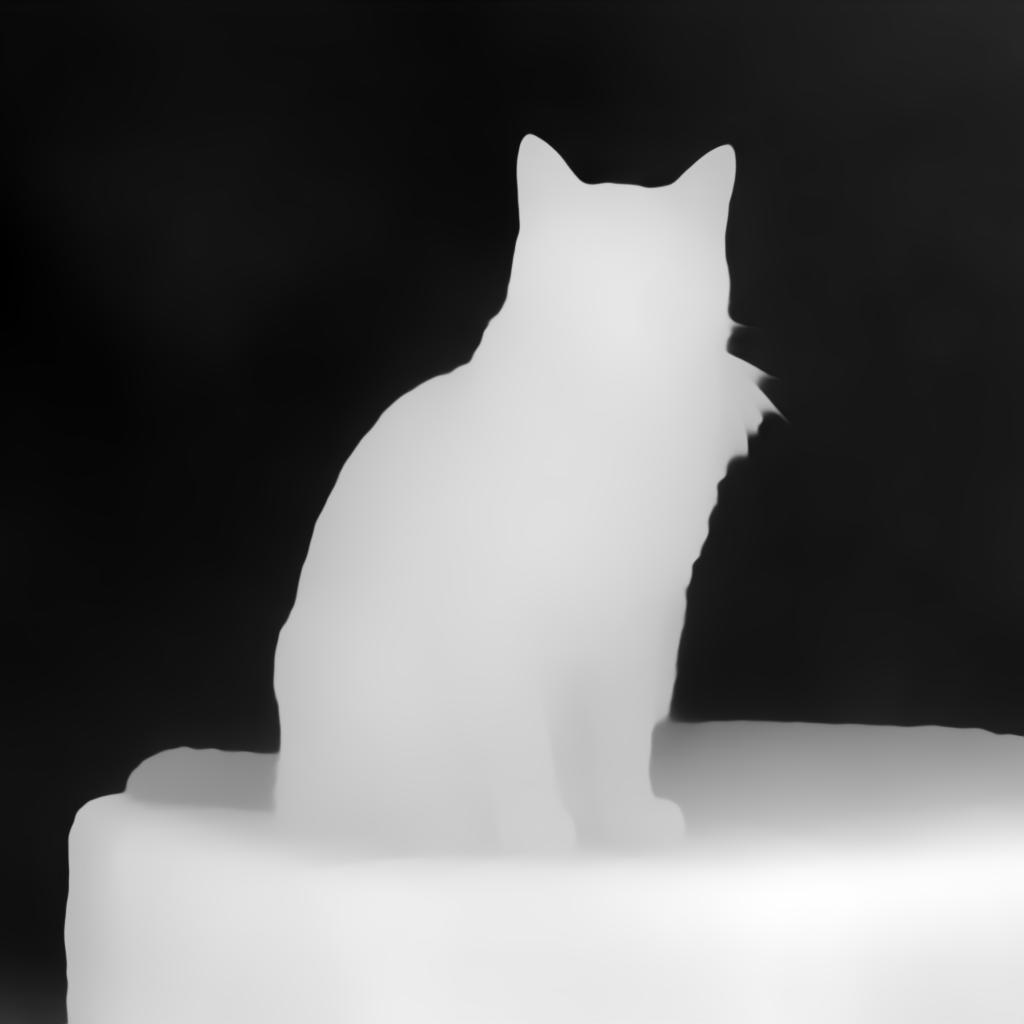 |
 |
Structure Control + Image Editing + Color Adjustment
DiffSynth-Studio/Template-KleinBase4B-ControlNet controls composition, DiffSynth-Studio/Template-KleinBase4B-Edit preserves original image details like fur texture, and DiffSynth-Studio/Template-KleinBase4B-SoftRGB controls color tones, creating an artistic masterpiece.
image = template(
    pipe,
    prompt="A cat is sitting on a stone. Colored ink painting.",
    seed=0, cfg_scale=4, num_inference_steps=50,
    template_inputs = [
        {
            "model_id": 1,
            "image": Image.open("data/assets/image_depth.jpg"),
            "prompt": "A cat is sitting on a stone. Colored ink painting.",
        },
        {
            "model_id": 2,
            "image": Image.open("data/assets/image_reference.jpg"),
            "prompt": "Convert the image style to colored ink painting.",
        },
        {
            "model_id": 4,
            "R": 0.9,
            "G": 0.5,
            "B": 0.3,
        },
    ],
    negative_template_inputs = [
        {
            "model_id": 1,
            "image": Image.open("data/assets/image_depth.jpg"),
            "prompt": "",
        },
        {
            "model_id": 2,
            "image": Image.open("data/assets/image_reference.jpg"),
            "prompt": "",
        },
    ],
)
image.save("image_Controlnet_Edit_SoftRGB.png")
| Structure Control Image | Editing Input Image | Output Image |
|---|---|---|
|
 |
 |
Brightness Control + Image Editing + Local Redrawing
DiffSynth-Studio/Template-KleinBase4B-Brightness generates bright scenes, DiffSynth-Studio/Template-KleinBase4B-Edit references original image layout, and DiffSynth-Studio/Template-KleinBase4B-Inpaint keeps background unchanged, generating cross-dimensional content.
image = template(
    pipe,
    prompt="A cat is sitting on a stone. Flat anime style.",
    seed=0, cfg_scale=4, num_inference_steps=50,
    template_inputs = [
        {
            "model_id": 0,
            "scale": 0.6,
        },
        {
            "model_id": 2,
            "image": Image.open("data/assets/image_reference.jpg"),
            "prompt": "Convert the image style to flat anime style.",
        },
        {
            "model_id": 6,
            "image": Image.open("data/assets/image_reference.jpg"),
            "mask": Image.open("data/assets/image_mask_1.jpg"),
            "force_inpaint": True,
        },
    ],
    negative_template_inputs = [
        {
            "model_id": 0,
            "scale": 0.5,
        },
        {
            "model_id": 2,
            "image": Image.open("data/assets/image_reference.jpg"),
            "prompt": "",
        },
        {
            "model_id": 6,
            "image": Image.open("data/assets/image_reference.jpg"),
            "mask": Image.open("data/assets/image_mask_1.jpg"),
        },
    ],
)
image.save("image_Brightness_Edit_Inpaint.png")
| Reference Image | Redrawing Area | Output Image |
|---|---|---|
|
 |
 |